Setting Up Deposit Using Manual Bank Account Entry
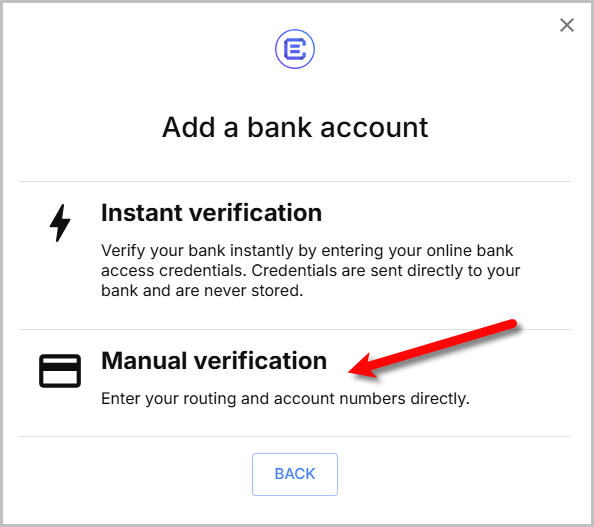
- When you get to this point, select Manual Verification instead of Instant Verification if you want to enter your bank account information manually.
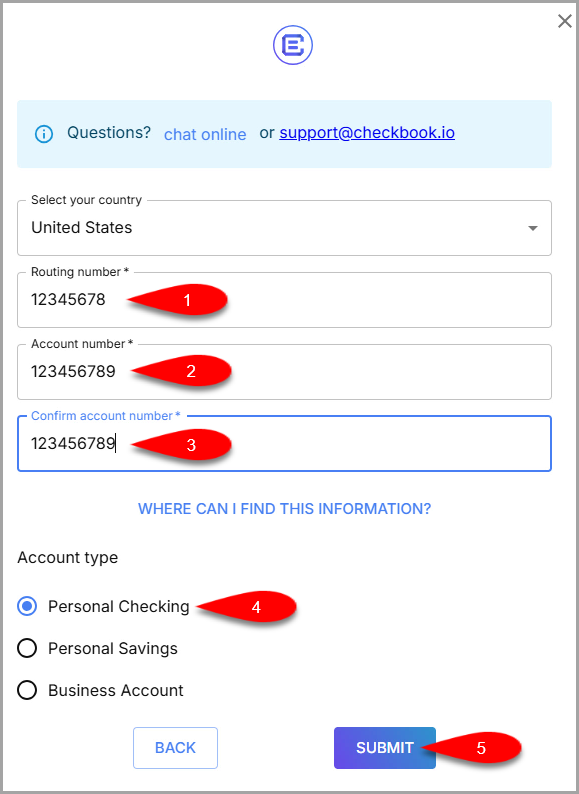
- Type in your bank account’s Routing Number and Account Number, then type in your Account Number once more.
Click the Submit button when finished.
- You can now select your manually entered Bank Account to receive your ACH payout.


Next Article In Section
Click the following link to move to the next article in this section:
Accepting A Payout After First Time Deposit Setup
Related Topics
Setting Up Deposit Using Manual Bank Account Entry ResaleWallet ACH Payouts Overview Setting Up ResaleWallet Editing Your ResaleWallet Profile Information Setting Up Your Bank Account Setting Up A Liberty Account For ACH Payouts How To Do A Signature Capture For ACH Payouts Creating A Single ACH Payout Mass Account ACH Payouts Reversing A ResaleWallet ACH Payout In Liberty Viewing ResaleWallet Payout Status In Liberty