Creating A Default eBay Return Business Policy
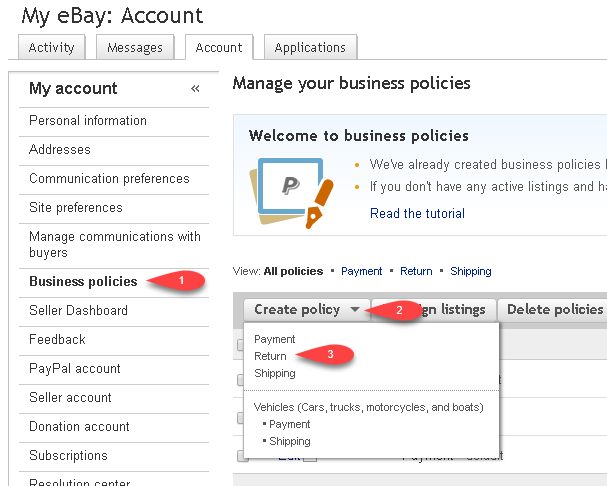
- Navigate to the eBay business policies page, click Create policy and then click on Return.
- Enter in your payment information.
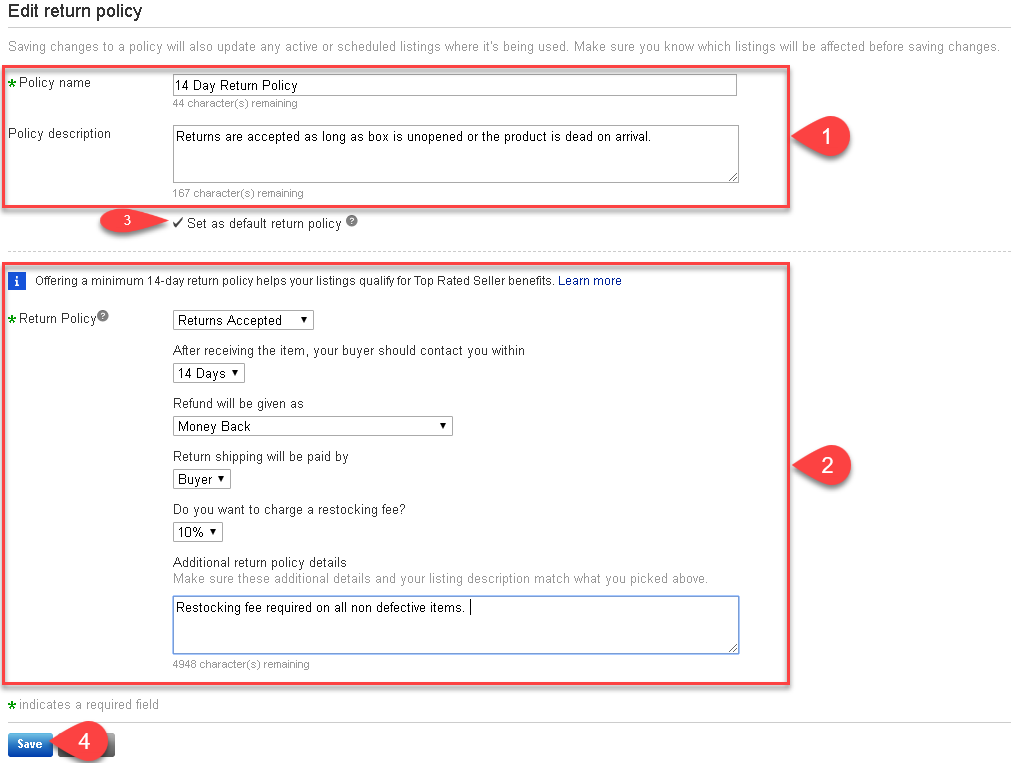
- Enter in your Policy Name and your Policy Description
- Select whether you want to have Returns Accepted, the number of days allowed for the customer to contact you about returning your item, how your refund will be given as, who the return shipping is paid by, whether you wish to charge a restocking fee and any additional policy details.
- Click the checkmark box next to Set as default return policy.
- Click the Save button.


Liberty will now use this Return policy by default when you create new eBay web listings in the Listing Manager.
Next Article In Section
Click the following link to move to the next article in this section:
Creating A Default eBay Shipping Business Policy
Related Topics
Creating A Default eBay Return Business Policy eBay Business Policies Overview Opting Into eBay Business Policies Getting To The eBay Business Policies Page Creating A Default eBay Payment Business Policy Creating A Default eBay Shipping Business Policy Adding A Regular Listing Adding A Retail Listing Creating an eBay Listing Overview Refreshing Listing Manager To Use eBay Business Policies That Have Been Changed Adding An eBay Item Specific Attribute