Setting Reports Security Levels
Report Security lets an authorized Liberty user control which roles can use individual reports, Favorites, and Batches in Liberty Reports.
This guide starts in Liberty Inventory and uses Sales Receipts to show how to assign the User role. Other report entries follow the same process.
Note: The User assignment shown here was temporary. Sales Receipts was restored to Everyone after the screenshots were captured.
Before You Begin
- Have a Liberty user with access to Reports, Full Reports, Admin, and Report Security.
- Know which Liberty role or roles should be allowed to use the report.
Manage Report Security Levels
- Click Reports on the Liberty Inventory menu bar.
- Click Full Reports at the bottom of the menu.

- In Liberty Reports, click Admin.
- Click Report Security. If Liberty asks for authorization, enter an authorized Liberty user and continue.

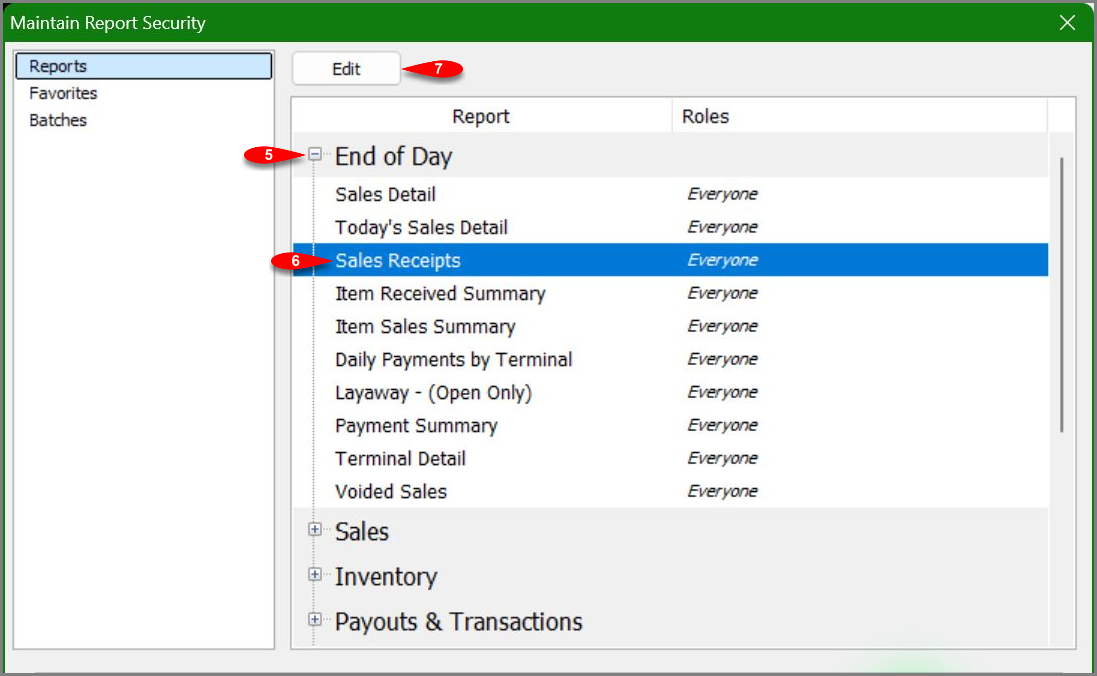
- Click the plus sign next to End of Day to expand the report group.
- Select Sales Receipts. The Roles column currently displays Everyone.
- Click Edit.
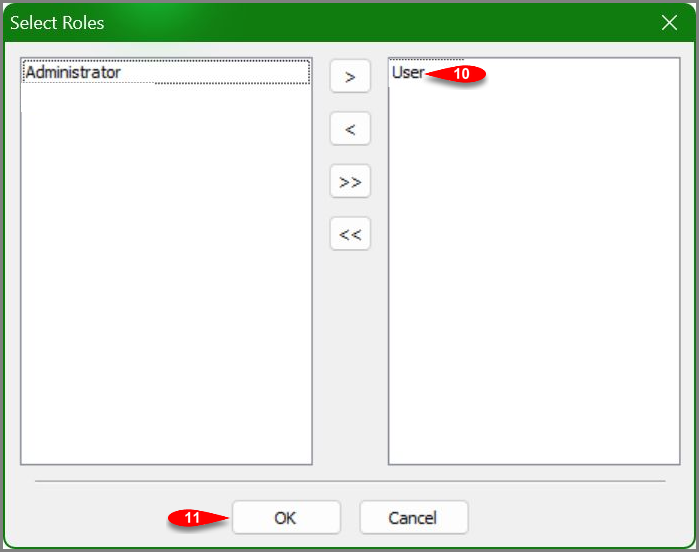
- Select User in the left list.
- Click the single right arrow to move User to the right list.

- Confirm that User appears in the right list.
- Click OK to accept the Select Roles list.
- Confirm that User appears in the Roles column for Sales Receipts.
- Click OK in Maintain Report Security to finish.


Report Security Reference
- Reports, Favorites, and Batches: Choose the section that contains the item whose role assignment you want to maintain.
- Everyone: The report is not limited to one or more selected roles.
- Left list: Roles available to assign to the selected report.
- Right list: Roles assigned to the selected report.
- Single arrows: Move the selected role in the indicated direction.
- Double arrows: Move all roles in the indicated direction.
Note: To return a report to Everyone, move every assigned role back to the left list, click OK in Select Roles, and click OK again in Maintain Report Security.
Verify the Role Assignment
Open Report Security again, select the report, and confirm that the intended role or Everyone appears in the Roles column.
Troubleshooting
- Edit is unavailable: Select an individual report. A report group heading does not enable Edit.
- The report is not visible: Click the plus sign next to the appropriate report group.
- The Roles column still displays Everyone: Open Edit again and make sure the intended role appears in the right list before clicking the first OK.
- The change does not appear to finish: Click OK in Select Roles, then click OK in Maintain Report Security.
- Liberty asks for authorization: Use a Liberty user that is authorized to maintain report security.
Next Article In Section
Click the following link to move to the next article in this section:
Exporting Reports