Hourly Sales Report
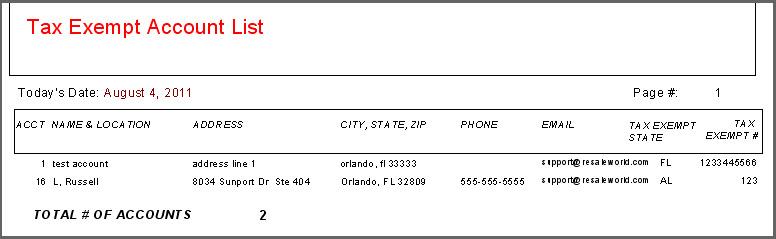
Displays account information for tax exempt accounts. Includes Address, Phone Number, Tax Exempt Number, and state. Information for each account appears on one line.
When to Use
Use this report to generate a list off account with Tax Exempt credentials.
Note: Update 6.0b: The Hourly Sales Report now separates sales out up through 10 PM.
How To Get To This Report
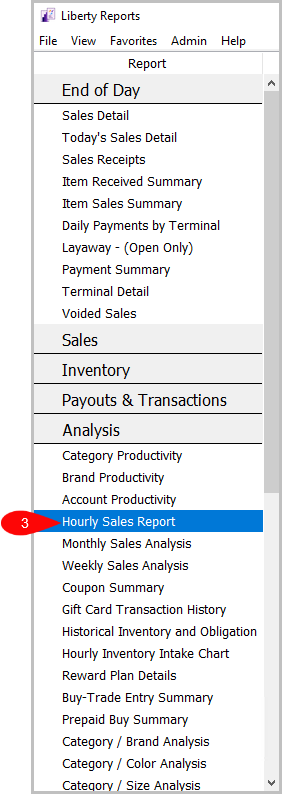
Reports > Analysis > Hourly Sales Report
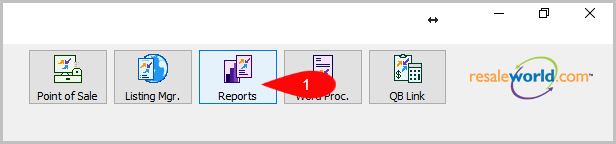
- Click on Reports.
- Click on Analysis.

- Click on Hourly Sales Report.


How To Add More Criteria
1. Click on Add More Criteria.
 2. Select what criteria you want then press OK.

Criteria Choices
- Account Added By
- Account Modified By
- Account Number
- Account Type
- Active Account?
- Birthmonth
- City
- Date Added
- Display Which Accounts?
- Donate Allowed
- Filter Code
- Inactive Date
- Last Date Item Added
- Last Date Modified
- Last Purchase Date
- Last Transaction Date
- State
- Zip Code
Next Article In Section
Click the following link to move to the next article in this section:
Hourly Inventory Intake Chart