Open Your Wallet with an Access Link
You open your wallet with a secure access link instead of a password.
- Open the email from your store and click Setup My Account. You are taken straight to your wallet.
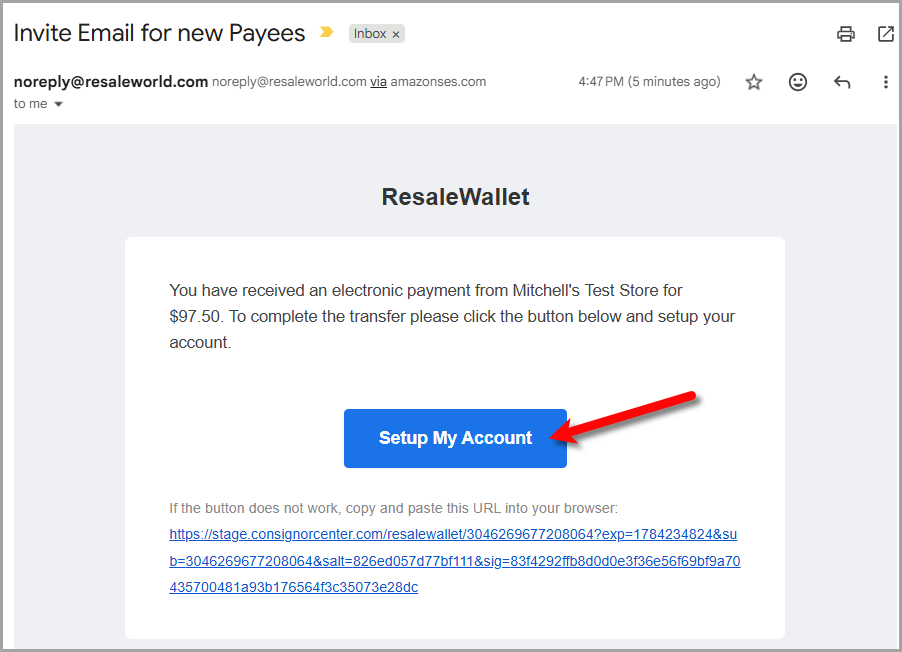 In the invite email, click Setup My Account to open your wallet and continue setup.
 - If you do not have a current link, go to the Request Access page, type your email address, and click Send Link.
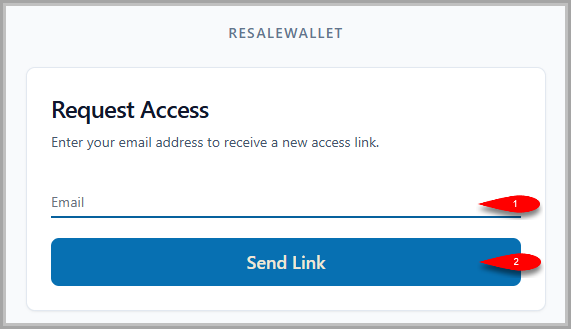 The Request Access page: enter your email address, then click Send Link to receive a new access link.
 - Check your inbox for the new access link. If you do not see it within a few minutes, check your spam or junk folder.
- Click the link in the email to open your wallet.
Note: Access links expire for your security. If your link no longer works, just request a new one from the Request Access page. If you request several in a row, give it a minute, repeated sends can be temporarily rate limited.
Next Article In Section
Click the following link to move to the next article in this section:
Create Your ResaleWallet Account and Verify Your Email Address