Creating A Default eBay Payment Business Policy
- Navigate to the eBay business policies page, click Create policy and then click on Payment.
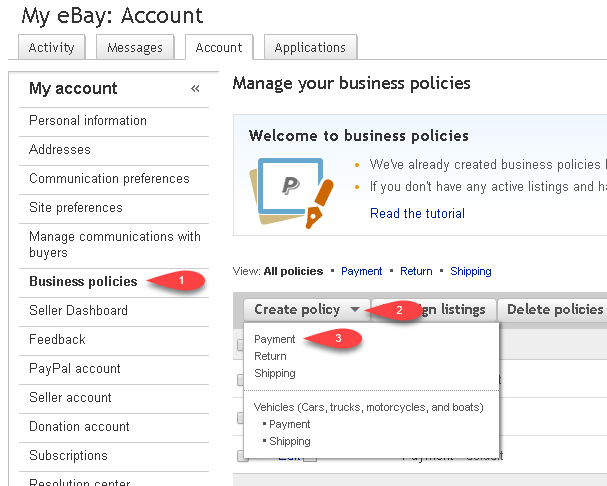
- Enter in your payment information.
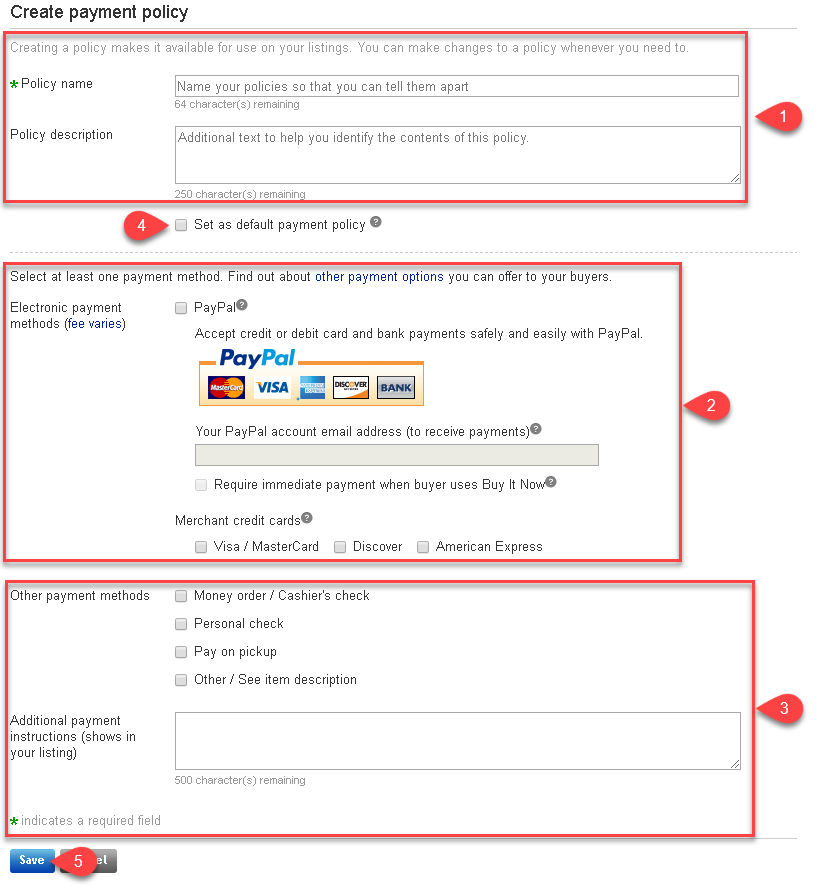
- Fill in your Policy Name and Policy Description
- Select whether you wish to use PayPal accept credit card payments and then your PayPal account email address where payments will be sent. Select which credit cards
Under Merchant credit cards, select which credit cards you will be accepting only if you have a pre-existing separate merchant credit card account. For this option, the buyer must contact you in order to process their credit card. - Select other payment types you wish to make available on your listings attached to this payment policy.
- Click the checkmark box next to Set as default payment policy so that when Liberty pulls in your payment policies, it will use this one as the default. This will be denoted by an asterisk (*) from within Liberty.
- Click the Save button.


Liberty will now use this Payment policy by default when you create new eBay web listings in the Listing Manager.
Next Article In Section
Click the following link to move to the next article in this section:
Creating A Default eBay Return Business Policy
Related Topics
Creating A Default eBay Payment Business Policy eBay Business Policies Overview Opting Into eBay Business Policies Getting To The eBay Business Policies Page Creating A Default eBay Return Business Policy Creating A Default eBay Shipping Business Policy Adding A Regular Listing Adding A Retail Listing Creating an eBay Listing Overview Refreshing Listing Manager To Use eBay Business Policies That Have Been Changed Adding An eBay Item Specific Attribute