How To Edit A Pre-Paid Buy
You cannot edit the amount that is going to the client once you have entered a Pre-Paid Buy. This is so that you can edit the status on Pre-Paid Buys that do not have a closed status and the note on all Pre-Paid Buys regardless of status.
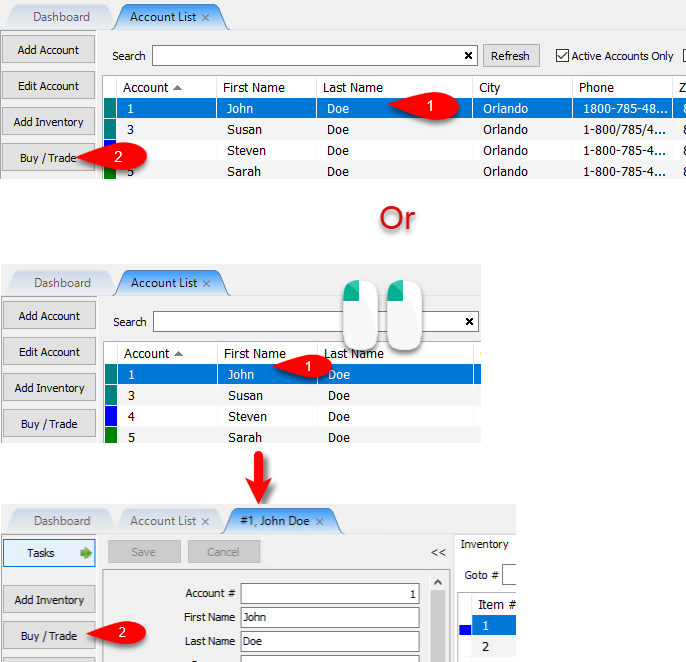
- From the Account List, select the account, then click on Buy / Trade.
Or
Open the Account first and then click on Buy / Trade.
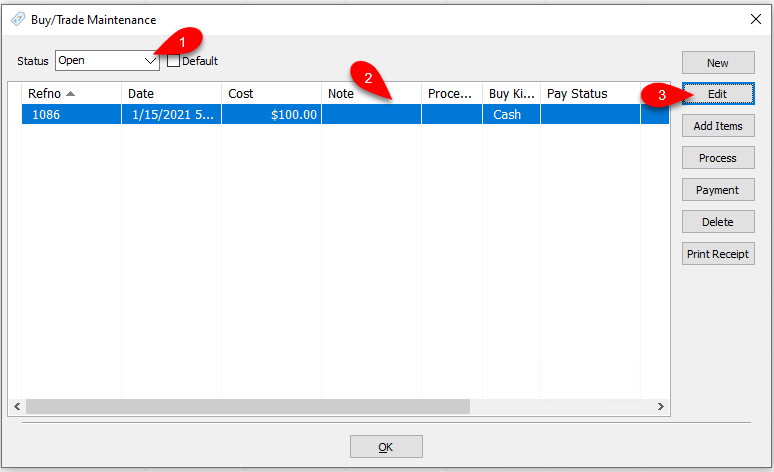
- Make sure you select the status and then select the Pre-Paid Buy and click on Edit.
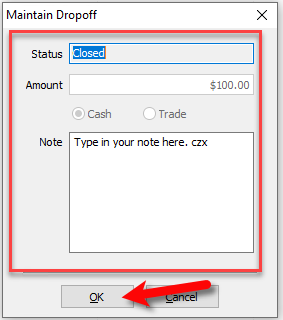
- You can make changes to Editable Fields and then click OK when you are finished.


Next Article In Section
Click the following link to move to the next article in this section:
How To Delete a Pre-Paid Buy That Has No Cash or Trade Transaction Added
Related Topics
How To Edit A Pre-Paid Buy Pre-Paid Buys Overview Turning on Pre-Paid Buys Creating A New Pre-Paid Buy Creating A Payment For Pre-Paid Buy Adding Items For A Pre-Paid Buy How To Process Inventory For A Pre-Paid Buy Printing A Receipt for a Processed Pre-Paid Buy How To Delete a Pre-Paid Buy That Has No Cash or Trade Transaction Added How To Add Your Own Pre-Paid Statuses Using the Wishlist