Max Holiday Price for Tax Holidays
Max Holiday Price is used with the tax holiday dates on a tax rate. It limits which individual items receive the tax holiday exemption.
Use this field when a tax holiday only applies to items at or below a specific item price.
Getting To Max Holiday Price
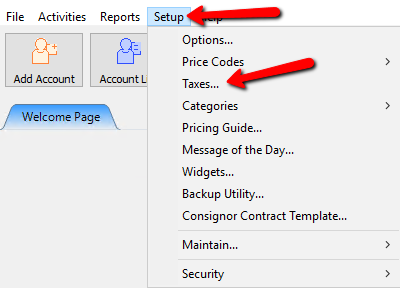
- Click Setup > Taxes.
- The Maintain Taxes dialog box will open. Select the Tax Group that contains the tax rate you need to change.
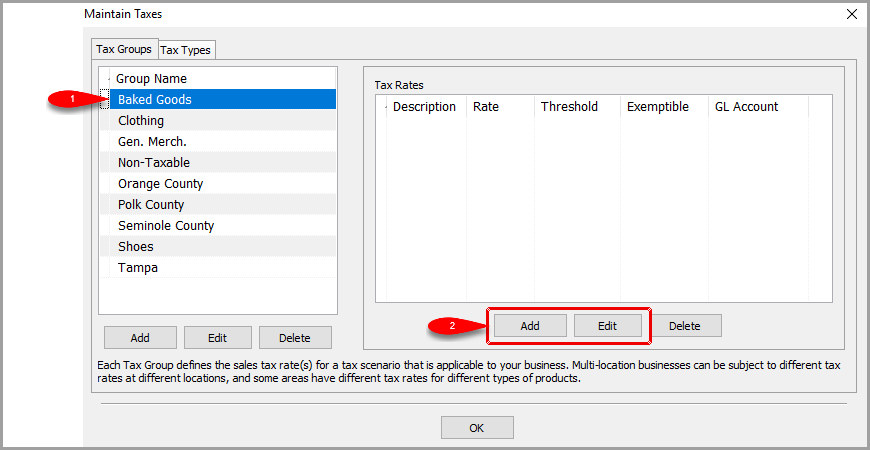
- If you are creating a new tax rate, click Add under Tax Rates. If you are changing an existing tax rate, select the tax rate and click Edit.
- In Maintain Tax Rate, make sure Can this tax be exempted? is set to Yes if this tax should be exempt during the tax holiday.
- Set Tax Holiday Start and Tax Holiday End for the holiday period.
- Enter the highest item price that can receive the holiday exemption in Max Holiday Price.
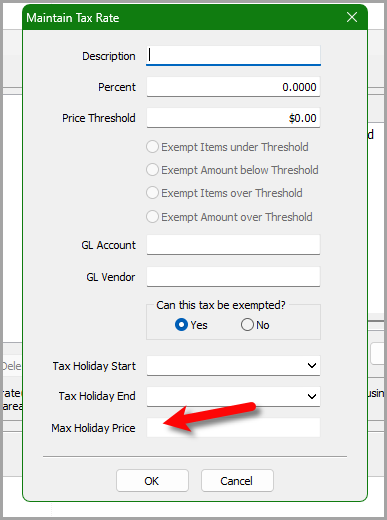
- Click OK to save the tax rate.


How Max Holiday Price Works
- Max Holiday Price applies to each individual item.
- Example with a maximum of $2,500: A $2,000 item is tax exempt during the configured holiday dates.
- A $2,600 item remains fully taxable.
- It does not exempt only the first $2,500 of an expensive item.
- Outside the holiday dates, normal tax rules apply.
- Leaving the field blank means no holiday price cap is enforced.
Info: Max Holiday Price is separate from the normal Price Threshold options above it. Price Threshold controls normal threshold based tax behavior. Max Holiday Price only controls the tax holiday price cap.
Technical Reference
Max Holiday Price was added in Inventory build 1927. The database field is TAX_RATE.EXEMPT_HOLIDAY_LIMIT.
Internal reference: Bug 14057.
Next Article In Section
Click the following link to move to the next article in this section:
Tax Types and Location/Tax Group Association
Related Topics
Max Holiday Price for Tax Holidays Setting Up Tax Codes, Tax Groups, and Tax Rates Tax Types and Location/Tax Group Association Tax Codes Overview Setup of a Single Location with a Single Tax Rate on all Items Setup of a Single Location with Different Tax Rates Setup Of Multiple Locations And A Single Tax Rate For Each Location Setup Of Multiple Locations and Multiple Tax Rates For Each Location Setup of Multiple Locations and the same set of Multiple Tax Rates for Each Location