Required Consignor Fields
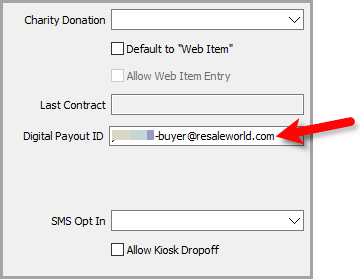
Each consignor who should receive a wallet payout needs a Digital Payout ID on their account. If the field is blank, the payout cannot be sent through ResaleWallet.
- Open any account you wish to set up for future payouts using ResaleWallet.
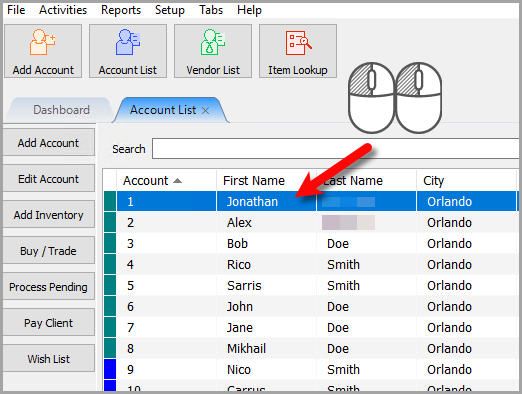
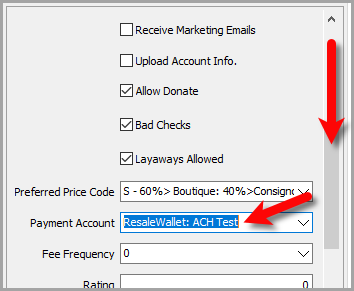
- For bulk payouts and future payouts, you can scroll down and set the consignor's payment account to ResaleWallet so the account gets picked up when you do a mass payout or auto selects ResaleWallet when you do a single payout:
- We also need to make sure that the Digital Payout ID is set to the email that the consignor wishes to receive ACH payouts with.
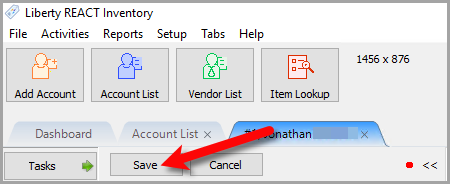
- Click the Save button.
Note: Alternatively, if you are paying out one client at a time, you can set the payment account at the time of the payout.


Next Article In Section
Click the following link to move to the next article in this section:
Paying Out A Single Client With ResaleWallet
Related Topics
ResaleWallet Store Guide Overview How To Set Up And Pay Consignors With ResaleWallet Set Up Your Business Entity Add a Bank Account Required Consignor Fields Paying Out A Single Client With ResaleWallet Mass Payouts With ResaleWallet Checking The Status of an ACH Payout What Consignors Receive ResaleWallet Dashboard Store Troubleshooting Payment Limits