Match Liberty Attributes to eBay Item Specifics
Use this procedure when a Liberty item contains an attribute value, but Suggested Attributes leaves the corresponding eBay item specific blank.
This example maps the Liberty Shoe Size attribute to the eBay US Shoe Size item specific for a women's Sandals listing. The same method can be used when another Liberty attribute needs to match the label expected by eBay.
Note: The category, attribute names, and values shown are examples. Use the correct Liberty category, eBay category, and exact eBay item specific label for the item being listed. Changing a Display Name affects how that category attribute appears for every item that uses or inherits it, so confirm the category scope before saving.
Before You Begin
- Have access to Liberty Item Entry, Listing Manager, and Setup > Categories > Category Editor.
- Confirm that the item is assigned to the intended Liberty category and that the source Liberty attribute contains a value.
- Know the correct eBay category and the exact item specific label that eBay expects.
- Review the category hierarchy before changing an inherited attribute. A change at a parent category can affect its child categories.
Match a Liberty Attribute to an eBay Item Specific
- In Item Entry, confirm that Category contains the correct Liberty category for the item.
- Confirm that Shoe Size contains the value that should populate in eBay. In this example, the value is 12.
- Click Listing Mgr.

- On the Listings tab, double click the listing that needs correction.

- In the listing, click eBay Info.
- Beside Category Value, click the ellipsis.

Info: We will be entering an eBay listing for a pair of Sandals in the following example
- Select Clothing, Shoes & Accessories.
- Select Women.
- Select Women's Shoes.
- Select Sandals.
- Click OK.

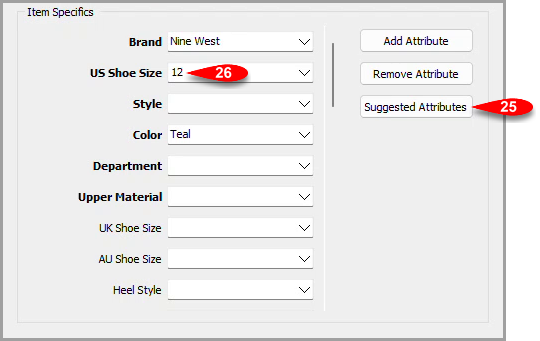
- Click Suggested Attributes.

- Close the listing. If Liberty asks whether to save the temporary diagnostic changes, click No.
- From the Liberty main menu, click Setup.
- Point to Categories.
- Click Category Editor.

- In the category tree, expand parent categories as needed and select Women's Apparel > Shoes/Footwear > Sandals.
- In Attributes, select Shoe Size.
- Click Edit.

- In Display Name, replace Shoe Size with the exact eBay item specific label US Shoe Size. Do not change the Attribute field.
- Click OK.

- In Maintain Categories, click OK to save the category attribute change.

- Click Listing Mgr. and reopen the listing.
- On eBay Info, select the eBay category again using the same category path from steps 7 through 11.
- Click Suggested Attributes.
- Confirm that US Shoe Size contains the Liberty value. In this example, the value is 12.


Attribute Matching Reference
- Attribute: The underlying Liberty attribute type. In this example, the Attribute field is W Shoe Size.
- Display Name: The category specific label shown in Item Entry. Set this to the exact eBay item specific label when the Liberty value should populate that eBay field.
- Attribute Kind: The semantic type assigned to the attribute, such as Size, Color, Brand, Season, or Condition. Liberty and ecommerce integrations can use these kinds in specialized ways.
- Suggested Attributes: Loads the eBay item specifics associated with the selected eBay category and fills values when Liberty has a matching attribute.
- Bold item specific: A field required by eBay for the selected category. Required fields must contain an acceptable value before the listing can be posted.
- Inherited category attribute: An attribute assigned to a parent category can cascade to child categories. This is why Edit Category Attribute can show Shoes/Footwear even when Sandals is selected.
Note: Assign an attribute at only one level within a category path. When a parent category already supplies the attribute, edit that inherited assignment instead of adding a duplicate at the child category.
Verify the Match
After reselecting the eBay category and clicking Suggested Attributes, confirm that the expected Liberty value appears in the matching eBay item specific. Review every bold item specific and enter an acceptable value before listing the item.
Troubleshooting
- The item specific is still blank: Confirm that the Liberty source attribute contains a value, that Display Name matches the eBay label exactly, and that the correct eBay category is selected. If there is any spaces before or after the attribute Display Name, the match will not work. Select the eBay category again, then click Suggested Attributes.
- The wrong items are affected: Review the category shown in Edit Category Attribute. The assignment may be inherited from a parent category and can affect every child category that inherits it.
- A required bold field is blank: Create or assign the corresponding Liberty attribute when appropriate, enter a valid item value, or select an acceptable eBay value directly. Required eBay item specifics cannot remain blank.
- The eBay category list is unavailable or returns a service error: The training recommends the current Event Service Worker for eBay category processing instead of the legacy Event Service. Verify the installed service and its status with ResaleWorld Support before changing service configuration.
Next Article In Section
Click the following link to move to the next article in this section:
Removing An eBay Item Specific Attribute