Set Up Your Business Entity
The store profile is the merchant identity record that ResaleWallet reviews. Liberty collects the information, but the final verification decision is made by ResaleWallet. Choose Edit Profile Information from the ResaleWallet area to open it. The Business Type you choose controls which panels are required.
From the ResaleWallet area you can edit the store profile, manage bank accounts, and upload documents when ResaleWallet asks for them.
- Click on Setup > ResaleWallet and then Edit Profile Information…
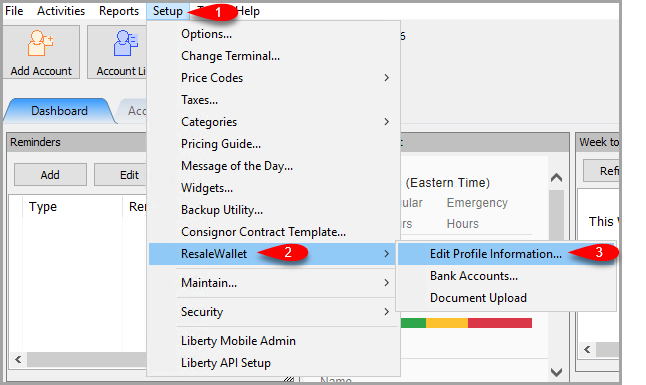 The ResaleWallet options: Edit Profile Information, Bank Accounts, and Document Upload.
 - Then, you can enter your profile information.
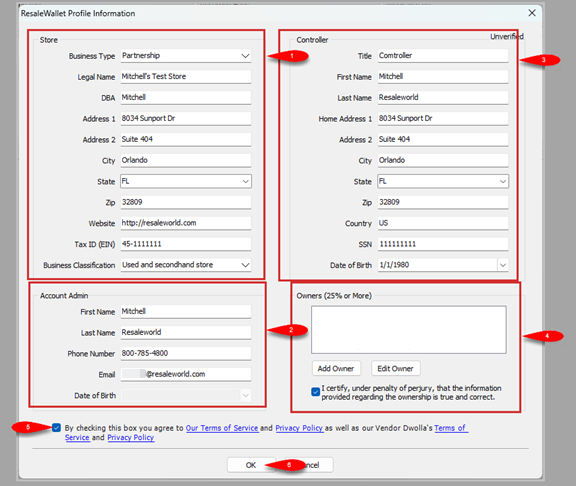 The ResaleWallet Profile Information screen. Business Type controls the required fields. Owners who hold 25 percent or more are added in the Owners panel.
 - Choose your Business Type. This controls which of the panels below are required.
- Fill in the Account Admin contact details.
- Fill in the Controller details. The controller is not required for a sole proprietorship.
- In the Owners (25% or More) panel, add any individual who owns 25 percent or more of the business. This panel will always be visible but may not be accessible if the business type you select does not require this field. If there isn't an owner with a 25% share, you can leave this blank. Check the box to certify that the information is correct
- Checkmark the box to Agree To The Terms and Conditions. You can click on any of the highlighted text to view the information.
- Click OK button when finished.
Business type notes:
- Sole proprietorships are usually simpler and may not require a separate controller section.
- LLCs, corporations, partnerships, and similar structures can require controller and beneficial owner information.
- Non-profits, such as charity shops, can require a controller even though ownership is handled differently.
- Some business types require a document upload after ResaleWallet reviews the profile.
Note: The Full Social Security Number is required for the Beneficial Owner. In other cases, just the last 4 digits of the social security will be required. Resaleworld does not store this information.
Note: Liberty does not validate this information beyond checking that the required fields are filled. Your store certifies that it is correct. After the details are accepted, the account status moves from Unverified to Verified. Payouts cannot be sent until the account is verified.
Next Article In Section
Click the following link to move to the next article in this section:
Add a Bank Account
Related Topics
ResaleWallet Store Guide Overview How To Set Up And Pay Consignors With ResaleWallet Set Up Your Business Entity Add a Bank Account Required Consignor Fields Paying Out A Single Client With ResaleWallet Mass Payouts With ResaleWallet Checking The Status of an ACH Payout What Consignors Receive ResaleWallet Dashboard Store Troubleshooting Payment Limits