Setting Up Your Bank Account
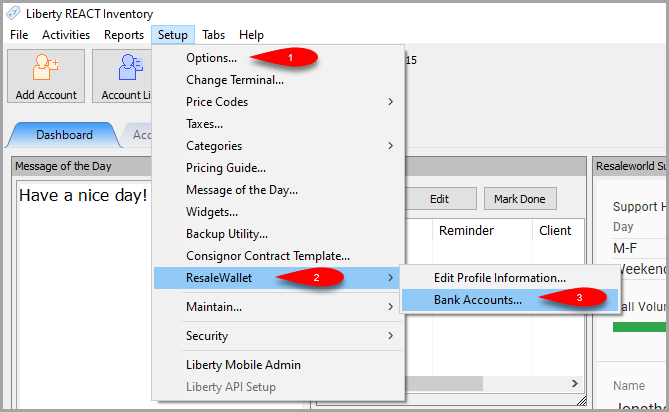
- Click on Setup > ResaleWallet > Bank Accounts…
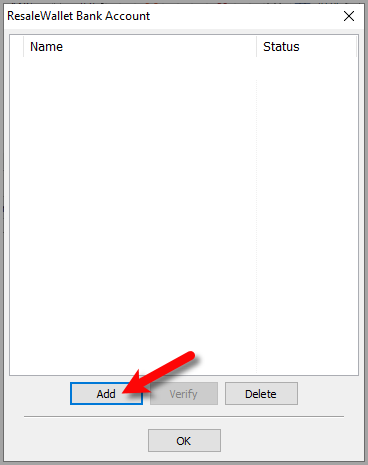
- Click the Add button.
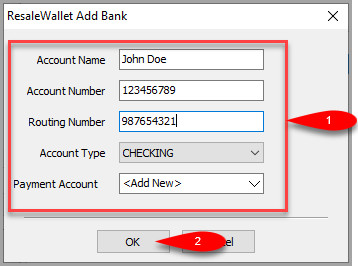
- Input your bank Account Name, Account number, Routing Number and Account Type.
For Payment Account, select the option for <Add New>, then click the OK button.
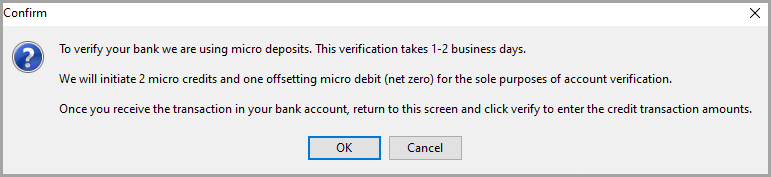
- We will then submit 2 micro transactions to your bank account which will take 1 to 2 business days to appear.
This is to verify that the right bank account will be used to pull money for your future ACH payouts.
Click the OK button when you are finished reading the message.
- Once you eventually see the two micro transactions hit your bank account, make note of what the amounts are.
You can then go back to Setup > ResaleWallet > Bank Accounts… and then click the Verify button.
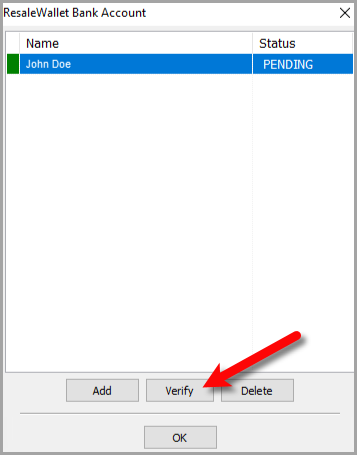
- Input the two Micro Transaction amounts that you received in your bank account and then click the OK button.
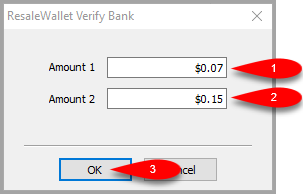
- The account will be marked as VERIFIED.


You are now ready to start doing ACH Payouts with ResaleWallet.

Next Article In Section
Click the following link to move to the next article in this section:
Setting Up A Liberty Account For ACH Payouts
Related Topics
Setting Up Your Bank Account ResaleWallet ACH Payouts Overview Setting Up ResaleWallet Editing Your ResaleWallet Profile Information Setting Up A Liberty Account For ACH Payouts How To Do A Signature Capture For ACH Payouts Creating A Single ACH Payout Mass Account ACH Payouts Reversing A ResaleWallet ACH Payout In Liberty Viewing ResaleWallet Payout Status In Liberty ResaleWallet Payments Dashboard