Creating A Single ACH Payout
To see the training video on this process, please visit the following link:
How To Send A Single ACH Payout With ResaleWallet From An Account
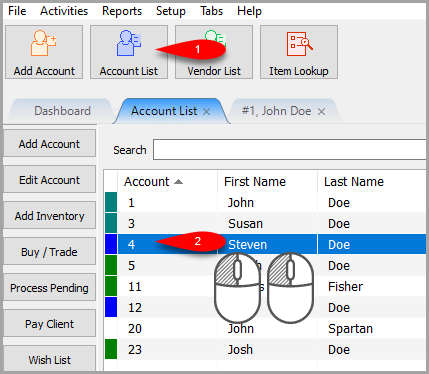
- Click on Account List and then select the account you want to send an ACH payout to.
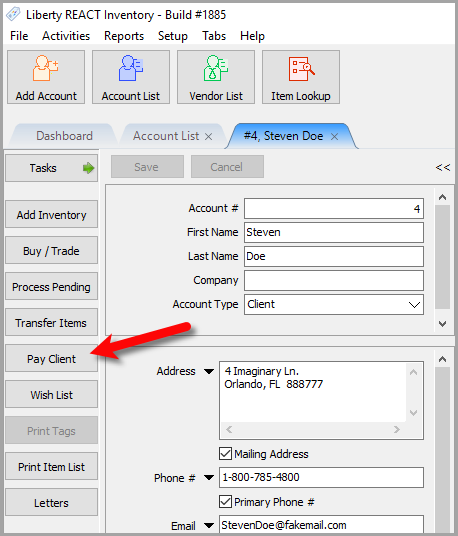
- Click the Pay Client button.
- Make sure your ResaleWallet payment account is selected, then make sure Payout Fee and Minimum are set.


Note: ACH payouts must be at least $7.50. This limit helps ensure the payout can be processed successfully after ACH handling. If an amount below the minimum is entered, Liberty will display the validation message: “Payout amount must be greater than $7.50.”
Example: A $5.00 payout will be rejected. A $7.50 payout is allowed, and the $2.50 ACH fee is applied separately.
  Click the **OK**  button. \\ {{:libertyreact:lib:newitem5070.png|NewItem5070.png}}
- Confirm the total **Payout Amount**  and then click the **Export Payout**  button. \\ {{:libertyreact:lib:newitem5069.png|NewItem5069.png}} \\ oNOTE: **If you click the OK button without exporting the payout, you will be asked if you would like to export the payout** \\ **Exporting the Payout is the actual processing of sending the ACH payout to the client's digital payout ID email**: \\ {{:libertyreact:lib:2025_02_25_13_59_12.png|2025-02-25_13-59-12.png}} \\ **If you click the No option, you can choose to post the payout to the account without sending out an ACH payout**. \\ **You would only do this if you paid the client outside of Liberty, this should be a rare situation** \\ {{:libertyreact:lib:2025_02_25_13_58_14.png|2025-02-25_13-58-14.png}}
- You can send out an **Email**  with payout details attached as a **PDF**  if you have **Liberty**  setup to email out. \\ Click the **OK**  button when finished reviewing options here. \\ {{:libertyreact:lib:newitem5068.png|NewItem5068.png}}
- The dialog box should say **Payout Complete**, click the **OK**  button.
The Post Payout dialog box will now close.

Your consignor should now receive their ACH payout in their email account and can now go through the deposit process.
Next Article In Section
Click the following link to move to the next article in this section:
Mass Account ACH Payouts
Related Topics
Creating A Single ACH Payout ResaleWallet ACH Payouts Overview Setting Up ResaleWallet Editing Your ResaleWallet Profile Information Setting Up Your Bank Account Setting Up A Liberty Account For ACH Payouts Mass Account ACH Payouts Reversing A ResaleWallet ACH Payout In Liberty Viewing ResaleWallet Payout Status In Liberty ResaleWallet Payments Dashboard Consignor ACH Deposit Guide Overview