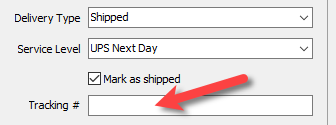
Adding or Changing The Shipping Information of An Order
Add a new order or edit an existing order by double clicking on one from the Orders tab to see the Maintain Order screen for an order.

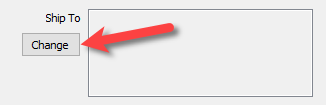
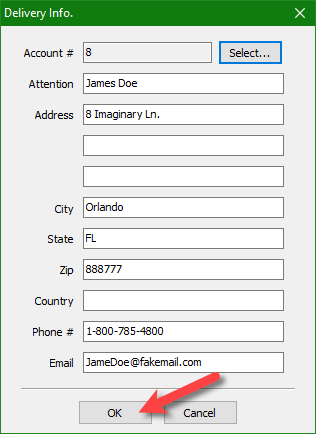
- Change Shipping Information: Allows you to type in the shipping information for the person you are shipping the purchased items to.
- Click the Change button.
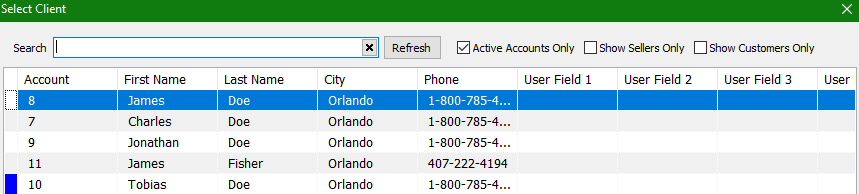
- Click the Select… button next to the Account # field.

- From here you can search for the account of the person purchasing the items on the order. If they are not in your account list yet, you can skip this step.
- You will notice that the account information will automatically populate from the account you selected in the prior step. If you person did not have an account with you, simply fill in the information manually.
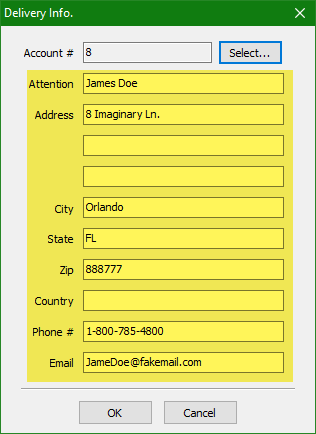
- Click the OK button.
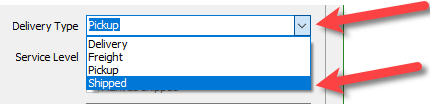
- Delivery Type: Allows you to specify which delivery method was used for the order.
- Click the dropdown arrow next to Delivery Type and then select the delivery method.
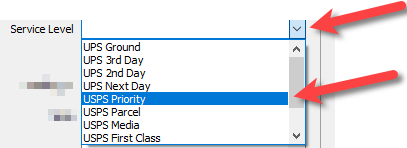
- Service Level: The service level dropdown will have shipping services populated when the Delivery Type is set to Shipped.
- Click the dropdown arrow next to Service Level to select the shipping service used with the order.
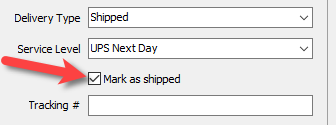
- Mark as Shipped: You can only checkmark this when a Service Level is selected. Will move the order over to the Shipped tab.
- Click on the checkmark box to Mark as shipped.
- Tracking #:Stores the tracking number for the order. If a tracking number is placed her and you are on ShopRW, the tracking number will populate for the online order.
- Allows you to type in the tracking number from whatever shipping provider you have selected, with the order is shipped.