Recurring Fees Overview
Here is the video that covers this content:
Recurring Fees Widget Features
Recurring Fees are fees that you authorize under your customer’s contract agreement and are charged periodically. When an account is given a Recurring Fee Cycle, those accounts will show under the Recurring Fees widget. See Applying A Recurring Fee Deduction To Accounts for more details.
Inside the Recurring Fees widget, you can see the Fee Cycle and the amount of the recurring fee. You can easily adjust the recurring periods, the number of times they recur, and the fee amount. See Adding A Recurring Fee Type for more details.

Another feature of this widget is that you can process fees manually. Just simply select the account and press on the Process button within the widget. A deduction transaction will be added to the consignors account with the appropriate fee amount.

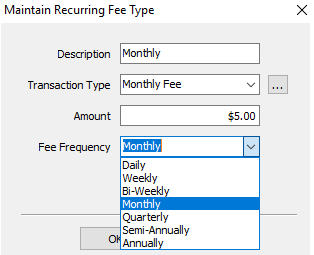
Recurring Fees have different cycles you can choose from.
- Daily
- Weekly
- Bi-Weekly
- Monthly
- Quarterly
- Semi-Annually
- Annually

To learn how to create this widget, see Adding A Widget.
Note: Only one Recurring Fee widget can be created.
Next Article In Section
Click the following link to move to the next article in this section:
Adding a Recurring Fee Type
Related Topics
Recurring Fees Overview Adding a Widget Widgets Overview Recurring Fee Types How To Use The Recurring Fees Widget Applying a Recurring Fee Deduction to Accounts Adding a Recurring Fee Type Associating a Recurring Fee Type with an Account How To Use The Message Of The Day Widget How To Use The Reminders Widget