Training - Accounts Overview
Client & Store Accounts
For each consignor or customer that provides merchandise for either consignment or purchase/trade, you will need to create an Account to keep track of inventory and transactions. After you create an account, you can begin adding inventory. If you also like to keep records of customers (people who make purchases only in your store) you can create an account as well.
How To Create A Consignor/Customer & Store Account
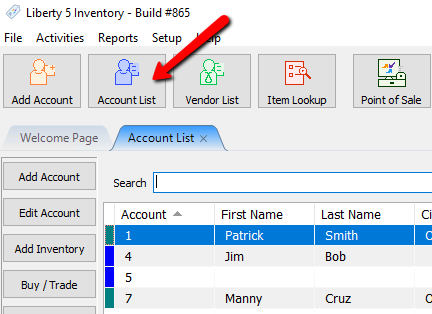
- In Liberty, click on Account List.
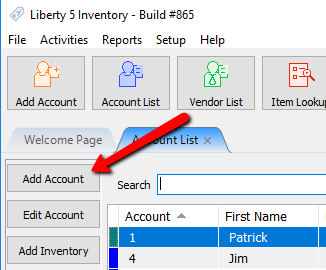
- Click the Add Account button.
The Add Account Dialog box appears.
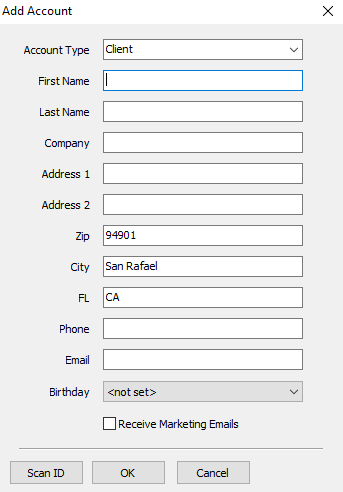
- Fill out the account details to finalize creating an account.
Note: From the Account Type Drop Down, you can specify the account as a Client/Consignor or Store Account.
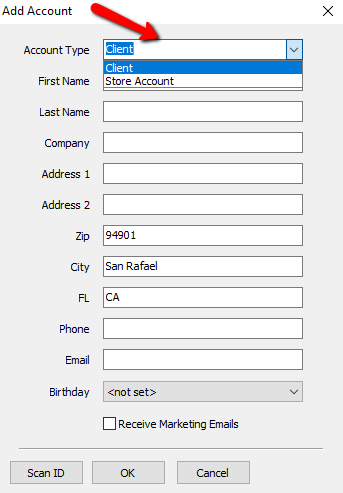
Client: this account type is used for consignors and customers.
Store Account: use to create accounts for merchandise purchased by the store, such as from liquidators, garage sales, owners and/or employees personal belongings, etc.
Note: Only Client and Store Account can be created from the Add Account Menu Option. For Retail Vendor Accounts, please see below for further instructions on how to create a Retail Vendor Account.
Retail Vendor Account
Retail Vendor Accounts are accounts where inventory is purchased from a Retail Vendor. Often these items are bought in quantities. Retail items are always purchased by the store.
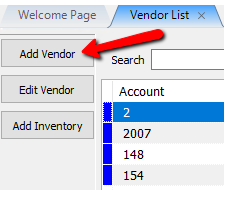
To access Retail Vendor accounts in Liberty REACT: - On Inventory Module, click on Vendor List

- Once you are on Vendor List, you can view all accounts, Select Add Vendor.
The Add Vendor Account dialogue box will open.
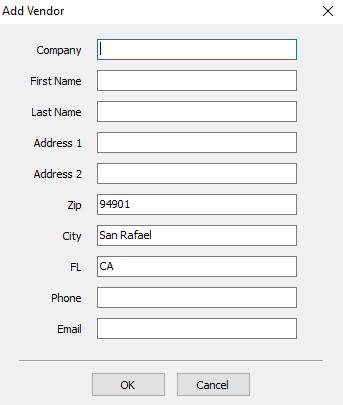
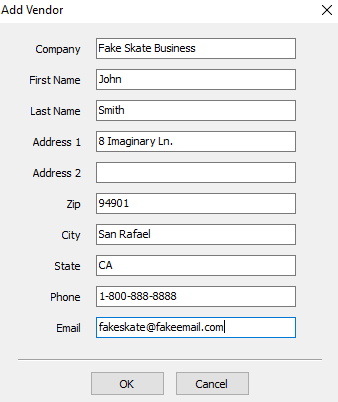
- Fill out the account details to finalize creating an account.


Next Article In Section
Click the following link to move to the next article in this section:
Creating New and Maintaining Existing Accounts
Related Topics
Training - Accounts Overview Add an Account Training Mode Adding a Consignor Contract to an Account Add a New Client Account Add Notes to an Account Attaching a Consignor Contract to an Account Creating New and Maintaining Existing Accounts Deleting a Client Account Edit Account Information Email A Consignor Contract From An Account