Setup Of Multiple Locations and Multiple Tax Rates For Each Location
This is a Basic Guide for a store that will have a Setup of Multiple Locations With the Same Rates For Items, but Different Rates Based On Location. This guide is assuming you only have 2 locations. Stores with more then two will need to take this in consideration when viewing the guide.
Note: This is a guide and not intended to be the way taxes “Have” to be set up.
The following is a basic suggested model and instructions on how to set up.

Note: The names used for the Tax Types, Locations, Tax Groups, and the amounts set in the Tax Rates, are all for demonstration purposes only. Feel free to use whatever names and rates applicable for your location.
Create Tax Groups
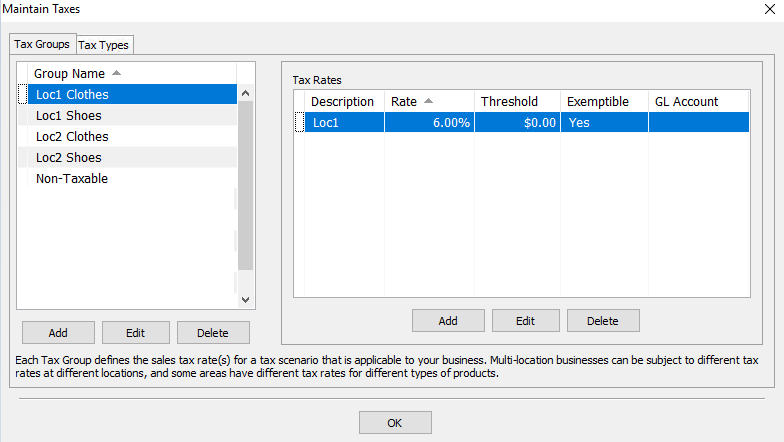
- Create five Tax Groups. One for each Location and Tax Type, and one for Non-Taxable sales.
- Create two Locations.
Note: Check Out Setting Up Tax Codes, Tax Groups, and Tax Rates and Tax Types and Location/Tax Group Association for details on setting up tax codes - For the Location 1 Loc1 Clothes (Group 1) enter in the Tax Rate.
- For the Location 2 Loc2 Clothes (Group 2) enter in the Tax Rate.
- For the Location 1 Loc1 Shoes (Group 3) enter in the Tax Rate.
- For the Location 2 Loc2 Shoes (Group 4) enter in the Tax Rate.
- For the Non-Taxable Group enter in a rate of 0%

Create Tax Types And Apply The Location/Tax Group Associations
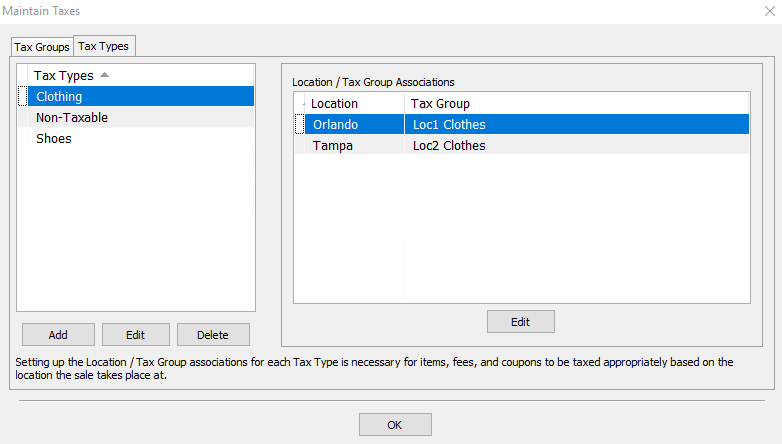
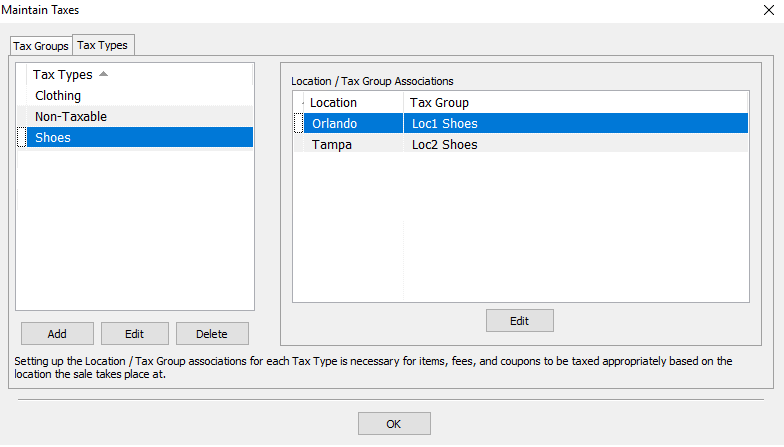
- Click on the Tax Type tab, click on Add and add three new tax types. One Tax Type for Item type1, Another for Item type2 and one for Non-Taxable items.
- For the Taxable Tax Type, set you each location to have the group association of the Taxable Sales group.
- For the Non-Taxable Tax Type, set you each location to have the group association of the Non-Taxable group.


Next Article In Section
Click the following link to move to the next article in this section:
Setup of Multiple Locations and the same set of Multiple Tax Rates for Each Location
Related Topics
Setup Of Multiple Locations and Multiple Tax Rates For Each Location Setting Up Tax Codes, Tax Groups, and Tax Rates Setting Up Product Lines Category Editor Tax Codes Overview Tax Types and Location/Tax Group Association Setup of a Single Location with a Single Tax Rate on all Items Setup of a Single Location with Different Tax Rates Setup Of Multiple Locations And A Single Tax Rate For Each Location Setup of Multiple Locations and the same set of Multiple Tax Rates for Each Location Add, Change and Delete Categories