Assigning Product Lines to Categories
To Assign Product Lines To Categories
- Select Setup > Categories > Category Editor.
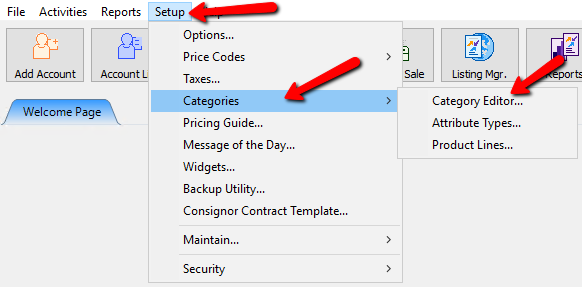
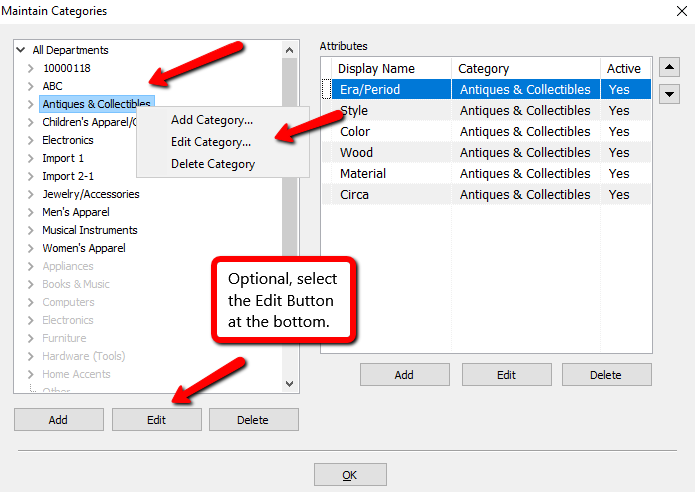
- Select the category you wish to assign a Product Line to. Right click it and select Edit Category.
Optionally you can click the Edit button at the bottom.
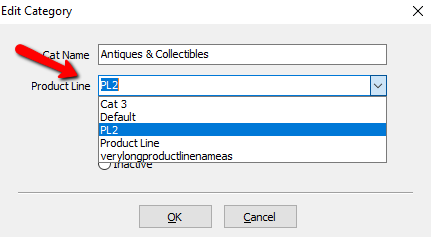
- Click the drop down for Product Line and select the Product Line you wish to associate with the Category
- Click the OK button when done.


A confirmation box will open. Click YES if you wish to apply the new Tax Type to all the items already in this Category. Click NO to only apply to new items added to this Category.

Note: That this change will Cascade to all Category items beneath this Category. See Category Editor for more details.
If there are Category 2 or Category 3 items in this Category 1 that should have a different Product Line, navigate to the item using the Category Editor, highlight the Category, then repeat steps 3-5.
Repeat steps 2-6 until as needed so that all Categories are assigned the proper Product Line.
Next Section Navigation Link
Click the following link to see a list of articles for the next section:
Categories
Related Topics
Assigning Product Lines to Categories Categories Overview Category Editor Product Lines Overview Setting Up Product Lines Why Categories are Assigned a Product Line Add, Change and Delete Categories Category Tax Code Update Selecting Categories During Item Entry Turn Categories On and Off About Item Fees