Maintain Security Options
The Maintain Security Options screen is used for configuring various security settings in Liberty.
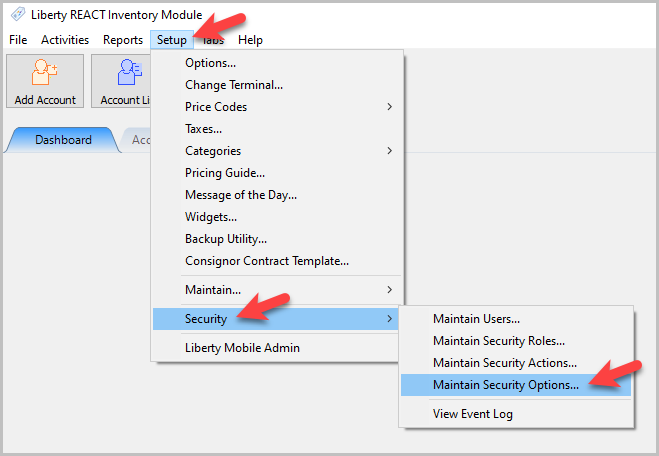
- To get to the Maintain Security Options screen, go to Setup > Security > Maintain Security Options.
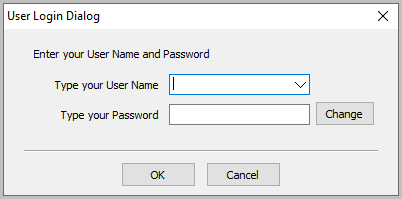
- You will need to login with an administrator account.
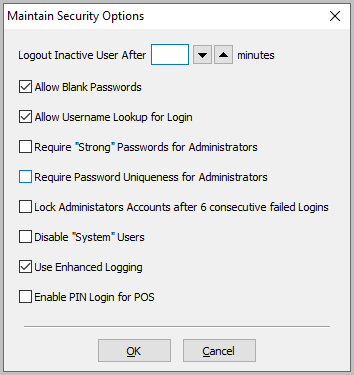
- The Maintain Security Options dialogue box will open.


Maintain Security Options
- Logout Inactive Users After # Minutes : Use this setting to log inactive users out of Liberty after a set number of minutes.
- Allow Blank Password : Checking this box off allows users to login without using a password.
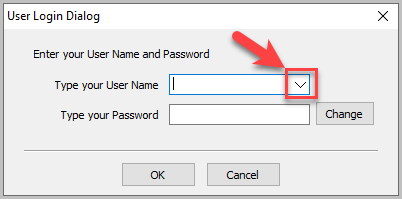
- Allow User Lookup For Login : When checked you will get a dropdown at the login screen that allows you to Select a user name. Without it checked, Users will be required to know their login name to be able to login.
- Require “Strong” Passwords For Administrators : When Checked, requires users with the Administrator Role to have a password consisting of a minimum of 7 characters and a combination of letters and numbers.
- Require Password Uniqueness For Administrators : When Checked, requires users with the Administrator Role to create a Unique password for their account when a new password is required.
- Lock Administrator Accounts After 6 Consecutive Failed Logins : When Checked, if an administrator fails to login after 6 attempts, the account will be locked.
- Disable “System” Users : This setting will disable any default users created by and installed with Liberty.
- Use Enhanced Logging : When checked will provide more detailed logging to the Support Log. See User Activity Log report.
- Enable PIN Login For POS : When this is checked allows for anyone with a Generated POS Pin number to be able to login using only their PIN, and not their login name and password.

Once any of these settings are changed, be sure to select the OK button.

Next Article In Section
Click the following link to move to the next article in this section:
Changing the Password for a User
Related Topics
Maintain Security Options Security Overview Maintain Security Roles Maintain Security Actions Changing the Password for a User Setting Up Employee Access Security Actions Searchable Index Setting up the Consignor Login App For Shopify Setting up email settings in Liberty Setting Up A Default Weight For New Items Within A Category