Setup Fee Frequencies
Accounts may be assessed a fee on a regular basis for a variety of reasons. Examples of such fees include:
- Annual Consignment Fee
- Monthly Rental Fee
Setting up Fee Frequencies makes assessing fees to a large number of accounts quick and convenient.
Note: Fee Frequencies by themselves do not do much. They are essentially labels assigned to an account to make it easier to charge fees to a group of accounts. Combined with Group Deductions, Fee Frequencies become a powerful tool.
Setting Up Fee Frequencies
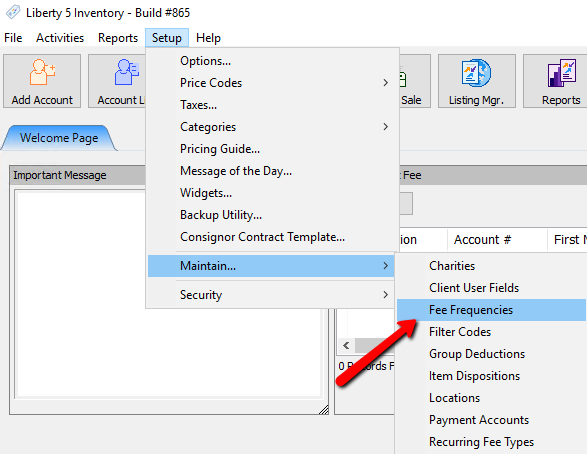
- Within Liberty select Setup > Maintain > Fee Frequencies.
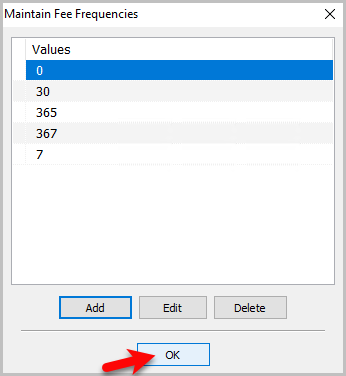
The Maintain Fee Frequencies Dialogue Box will open.
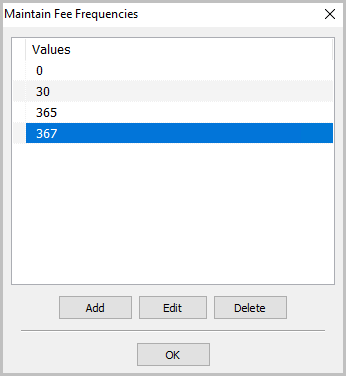
- Selecting the Add button or the Edit button will open the details of the Fee Frequency. Selecting the Delete button will delete the Fee Frequency.
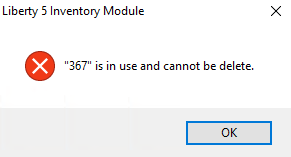
Note: Once a Fee Frequency has been used, it cannot be deleted. You will get the following error.
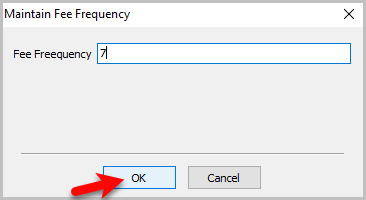
Fee Frequency Details box.
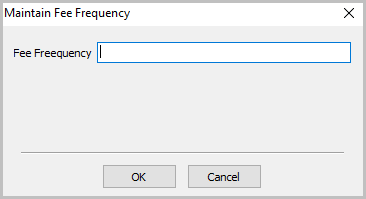
- Enter in a value for the Fee Frequency and press the OK button.
- You should see the new fee frequency. Press the OK button when done.


Next Article In Section
Click the following link to move to the next article in this section:
Setting Up Group Deductions
Related Topics
Setup Fee Frequencies Setting Up A Default Weight For New Items Within A Category Define Custom Field Names Define Filter Codes Setting Up Account Field Layout Setting Up Expire Groups Setting Up Group Deductions Setting Up Locations Setting Up Store Sections to Track Inventory Locations Spell Checking for Item Descriptions Setting up email settings in Liberty