Setting Up A Liberty Account For ACH Payouts
Accounts need to be set-up in order to receive ResaleWallet ACH payouts.
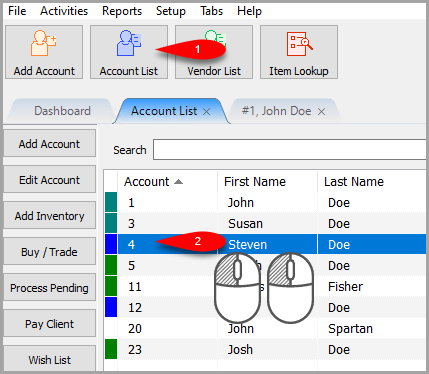
- Click on the Account List button and then open any account you want to start sending an ACH Payout to.
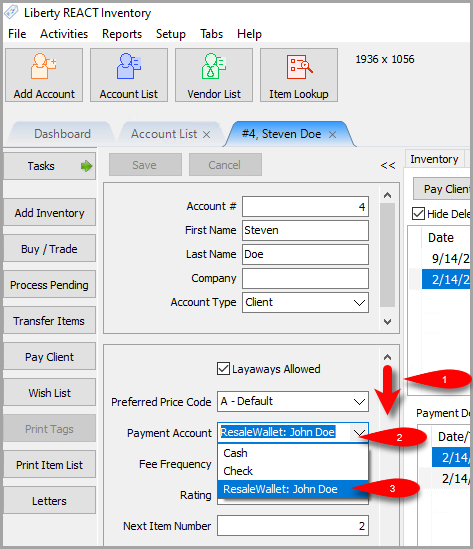
- In the 2nd Account Pane, scroll down until you see the Payment Account field.
Click the Dropdown button and then select the ResaleWallet option.
- Scroll down further until you see a Digital Payout ID field.


Here, you must fill in the email address the consignor wishes to receive their ACH payout at.
This can be different from the regular email recorded for the account. It is best practice to ask each consignor which email they want to use to receive their digital payout instead of copying the regular email assigned to the account.
When finished, click the Save button.

Next Article In Section
Click the following link to move to the next article in this section:
How To Do A Signature Capture For ACH Payouts
Related Topics
Setting Up A Liberty Account For ACH Payouts ResaleWallet ACH Payouts Overview Setting Up ResaleWallet Editing Your ResaleWallet Profile Information Setting Up Your Bank Account How To Do A Signature Capture For ACH Payouts Creating A Single ACH Payout Mass Account ACH Payouts Reversing A ResaleWallet ACH Payout In Liberty Viewing ResaleWallet Payout Status In Liberty ResaleWallet Payments Dashboard