Item Description with Extended History
Displays a detailed view of every transaction for each item, organized by account. Shows summary information for each item, including Original Quantity, Quantity On-Hand, Extended Price (price on-hand) and Cost of Available goods.
The sales records include the receipt/order number if applicable, and COGS information.
When to Use
Run the report to find Cost of Goods Sold over a particular time span, or to show the current Cost of Goods On Hand.
How To Get To This Report
Reports > End Of Day > Item Desc - Extended Sales History
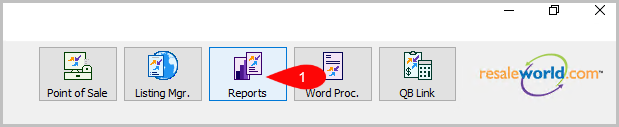
- Click on Reports
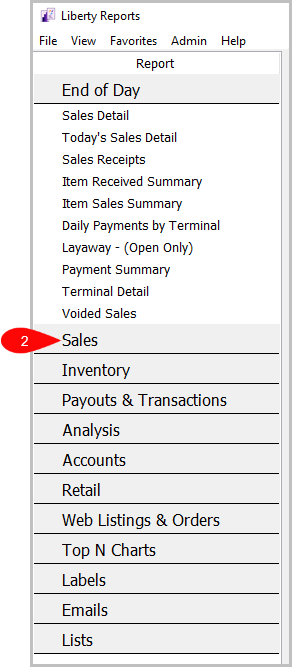
- Click on Sales.
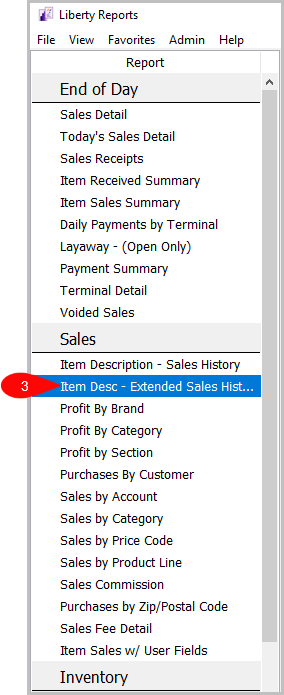
- Then, click on Item Desc - Extended Sales History.


How To Add Criteria
- Click on the Add More Criteria button.

- Select the criteria you want to add and then press OK.


Criteria Choices
- Active Account?
- Account Added By
- Account Type
- Account Numbers
- Cashier
- Category 1
- Category 2
- Category 3
- Cost/Net
- Custom 1
- Custom 2
- Custom 3
- Custom 4
- Custom 5
- Date Sold Posted
- Discount Type
- Filter Code
- Item Added By
- Item Description Keyword
- Item Disposition
- Item Number
- Item Received Date
- Item Status
- Location
- Market Place
- Payment Date
- Payment Type
- Price Code
- Product line
- Purchase Method
- Quantity On hand
- Receipt Number
- Sales Records
- Sales Status
- Selling Price
- Store Section
- Tag Color
- Tax Code
- Taxed
- Terminal Location
- Terminal ID
Next Article In Section
Click the following link to move to the next article in this section:
Item Description with Sales History
Related Topics
Item Description with Extended History Selecting the Right Report Item Description with Sales History Profit by Brand Report Profit by Category Report Profit by Section Report Purchases by Customer Report Purchases by Zip/Postal Code Report Sales by Account Report Sales by Category Report Sales by Price Code Report