Liberty Reports Overview
Liberty has a number of reports you can run to manage your store more efficiently, from end-of-day reporting to sales history by item.
To the casual observer the various report routines probably appear complex and uninviting. Yet the reports contained in Liberty are not difficult to learn, and used properly can help increase profitability. By exercising a little effort, the reports will provide you with a tremendous amount of power.
Instructions contained herein focus on teaching the underlying principles which govern how reports are generated. Learn the basic concepts and you will be able to easily generate any report.
The best way to learn how to use reports is to experiment. Many people operate under the mistaken belief that running reports might somehow harm the information in their system. This is incorrect. Reports only look at the data contained in the system, they don't change it. The information is then put into a format that makes sense.
Note: When accessing reports from Liberty’s main menu, all reports are displayed in the Reports screen. When accessing reports from the PoS module, only PoS related reports are available.
The First Concept To Understand When Generating A Report Is
If you do not change any of the Report’s settings (parameters), the report will include every item on file that fits the type of report being run.
For instance, if you run a sales report without changing any of the settings, you'll get a list of every single item ever sold with the system. This might be fine if you've been using the system for a few days, but not when you have used it for several years.
Generating a useful report requires eliminating the stuff you don't want from the report. This is known as Filtering the report. Filtering means taking a lot of information and reducing it to just what you want.
How To Access The Reports Module
There are 2 ways to access the Reports Module:
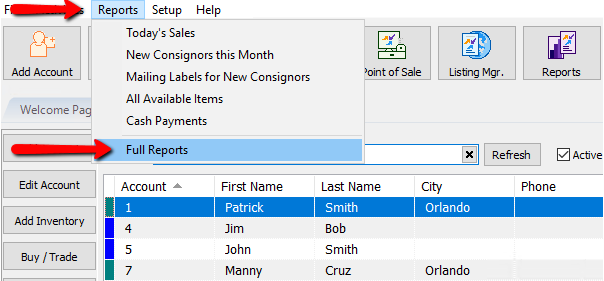
- Reports button : Across the top of the Inventory Module are buttons to other modules. Reports Module is one of them.

- Through The Reports menu : At the top of the Inventory Module are menu selections. Selecting Reports > Full Reports will open the reports module.


Starting Liberty Reports Create a Report Select The Right Report Setting Report Parameters Printing Reports View History of Account Purchases Sending Batch Emails to Clients
Next Article In Section
Click the following link to move to the next article in this section:
Selecting the Right Report