Account Export by Purchases Report
This report will give you a list of clients who have purchased items from your store. This report is able to be exported as a CSV file.

When to Use
Run this report to obtain information on clients who have purchased from your store, and to export a CSV file for use in other programs.
How To Find This Report
Reports > Account > Account Export By Purchases
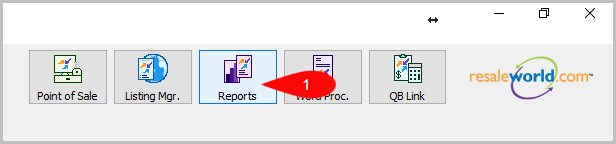
- Click on Reports
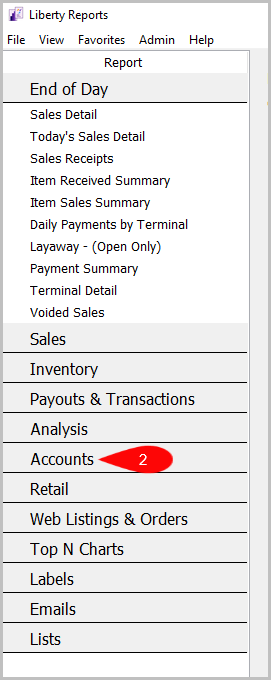
- Click on Account
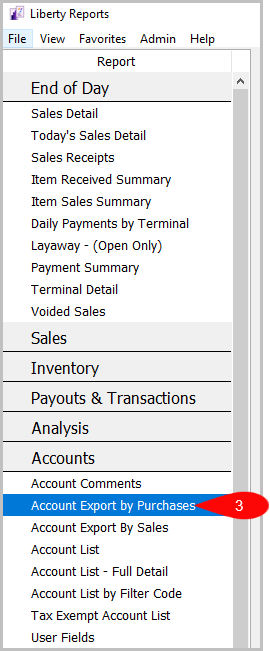
- Then Click on Account Export by Purchases


Criteria Choices
- Account Number
- Active Account?
- Available Inventory?
- Birthmonth
- Category 1
- Category 2
- Category 3
- Client Rating
- Date Added
- Date Sold/Posted
- Filter Code
- Has Email Address
- Last Date Item Added
- Last Modified Date
- Last Purchase
- Receive Email
- Receive Mail
- Terminal ID
- Total Purchases
- User Field 1
- User Field 2
- User Field 3
- User Field 4
- User Field 5
- User Field 6
- User Field 7
- User Field 8
- User Field 9
- User Field 10
- User Field 11
- User Field 12
- User Field 13
- User Field 14
- User Field 15
Next Article In Section
Click the following link to move to the next article in this section:
Account Export by Sales report
Related Topics
Account Export by Purchases Report Selecting the Right Report Account Comments Report Account Export by Sales report Account List Report Account List by Filter Code Report Account List - Full Detail Report Tax Exempt Account List Report User Fields Report Wish List - Cross Reference report Wish List Report