Reverse a Posted Payment
Inventory Module > Account > Payouts
Payouts may not be deleted, however, they can be reversed. When a payout is reversed, nothing happens to the original payout record, and a new record showing the reversal appears in the Payout History.
Note: While the term Delete is used liberally in this process, it is worth noting that even though it appears Liberty deletes payouts, in actuality it does not. This is done to maintain data integrity.
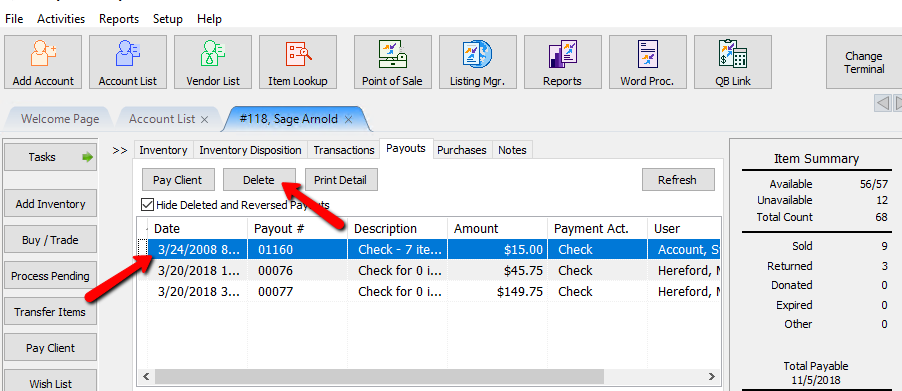
To see reversed payouts, click on the Hide Deleted and Reversed Payments checkbox to remove the check. (The check box is located about half way down the right side of the screen.)
To Reverse A Posted Payment
- Lookup the account containing the payout to be reversed.
- Select the Payout tab.
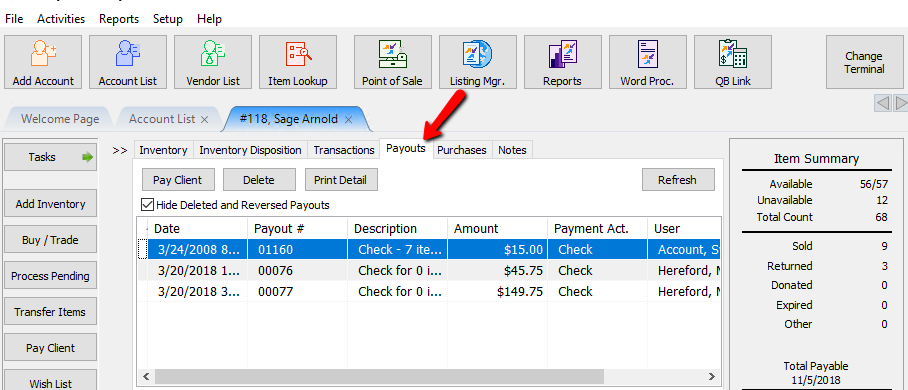
- Highlight the payout to be reversed and click the Delete button at the top.
- When the confirmation box opens and you are 100% sure you want to delete the payout, press the OK button.
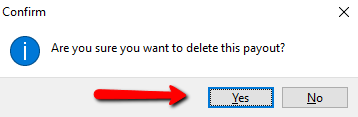
- When the second confirmation box opens, click the Yes button.


Next Article In Section
Click the following link to move to the next article in this section:
Void an Unposted Payment
Related Topics
Reverse a Posted Payment Payouts Overview Assessing Fees to Accounts and Items Change Payment Account for Multiple Accounts How To Set A Check Address Offset Pay One Account at a Time Pay Multiple Accounts Simultaneously Cancel Check Printing Restart Check Printing View Transaction History View Payout History