Change Payment Account for Multiple Accounts
Inventory Module > Activities > Accounting > Change Payment Accounts
Each account has a default Payment Account. If a change in banks is made, a new Payment Account is set up. This will necessitate changing the default Payment Account in many (or even all) accounts currently in the system. The Change Payment Accounts routine provides the ability to do this in one easy step.
To Change The Default Payment Account For Multiple Accounts Simultaneously
- Select Activities > Accounting > Change Payment Accounts.
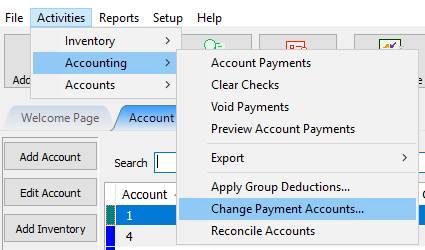
- The Group Payment Account Change dialog will display.
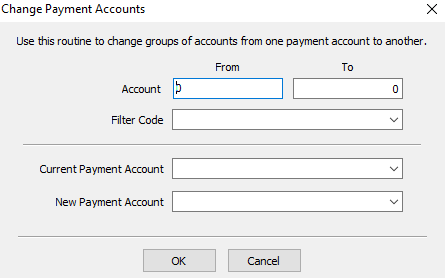
- Enter the range of accounts to make the change to in the Account From and Through fields.
- Enter the Filter Code for the accounts to be changed. Leave blank if Filter Codes are not used or if all accounts in the Account Range, regardless of Filter Code, will be changed.
- Select the appropriate Payment Accounts from the drop-downs provided for the Current (top) and New (bottom) Payment Account fields.
- Select OK.


Next Article In Section
Click the following link to move to the next article in this section:
Account Reconciliation / Reconcile Old Money Transaction Balances
Related Topics
Change Payment Account for Multiple Accounts Payment Accounts Determine Amount Payable to an Account Holder Assessing Fees to Accounts and Items How to setup check fees How To Set A Check Address Offset Clear Checks Combine/Reconcile open Transactions Credit/Debit a Client Account How to Expire a Posted Payment