Creating Pick bins For Sorting Picked Items
Pick Bins can help sort out the inventory you pick to ensure that all items that are part of a package/order can be fulfilled easily and properly.
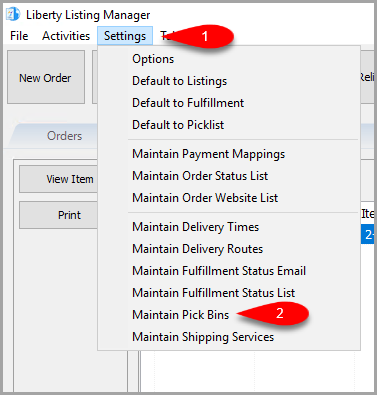
- Click on the Settings menu option at the top and then click on Maintain Pick Bins.
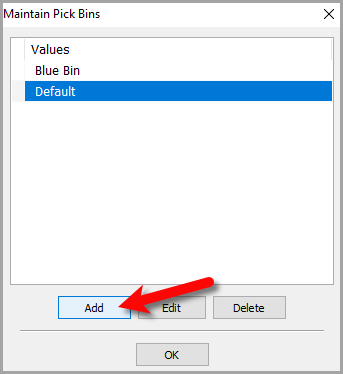
- Click the Add button.
- For the Description, type what you would like to name the Bin. If you have multiple stores, you can set the Location to the actual location of your store. Otherwise, you can just leave Location blank.
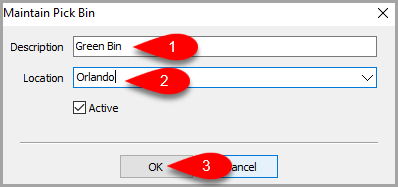
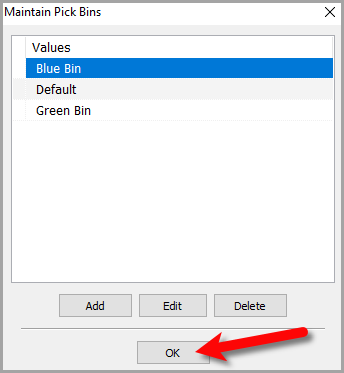
- Click the OK button.


Next Article In Section
Click the following link to move to the next article in this section:
Picking Items Into A Pick Bin
Related Topics
Creating Pick bins For Sorting Picked Items PickList Tab Overview Printing the PickList From The PickList Tab Picking Items In The PickList Tab Viewing Item Details Within The PickList Tab Flagging Items From The PickList Tab Picking Items Into A Pick Bin Adding An eBay Description Adding Images To An eBay Listing Definitions of Ebay Description Processor Buttons Deleting Images From An eBay Listing