Adding Delivery Notes To An Order
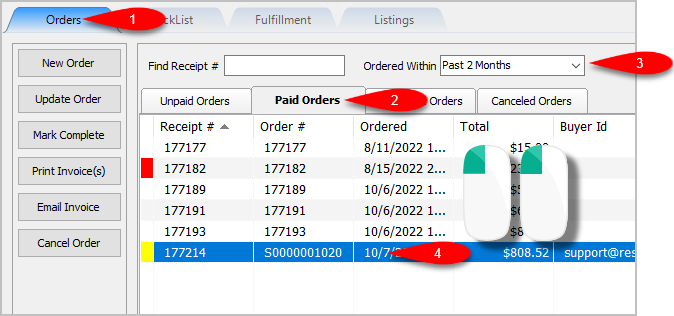
- Open the Listing Manager and navigate to the Orders tab. Most of the orders you will be working with will be under the Paid Orders sub tab but you can access fulfillment from any sub tab. Change the date range under the Ordered Within drop down to select the period of time you wish to work with. Then Double-Click on the order you want to Fulfill.
- You will now have access to the Fulfillment sub-tab of an order.
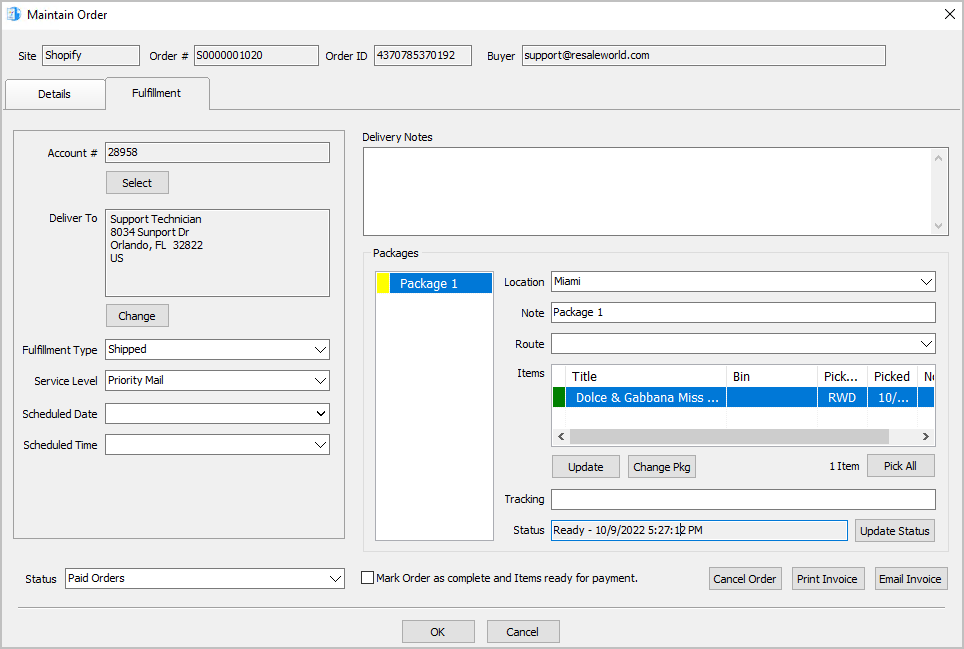
- For the Delivery Notes, you can type any information you think would be relevant to the Delivery of the order.



Next Article In Section
Click the following link to move to the next article in this section:
Changing The Fulfillment Location Of An Order
Related Topics
Adding Delivery Notes To An Order Fulfillment From The Order Tab Overview Getting To The Fulfillment Sub-Tab From An Order Changing The Account Used For the Fulfillment Of An Item Changing the Shipping Address Of An Order To Be Fulfilled Changing the Fulfillment Type and Schedule Details Of An Order Changing The Fulfillment Location Of An Order Dealing With More Than One Package For The Fulfillment Of An Order Changing The Delivery Route Of An Order Changing The Picked Status Of An Item Within Fulfillment Sub-Tab Adding The Tracking Number to Packages Within The Fulfillment Sub-Tab