How To Cancel An Order In Listing Manager
You can cancel an order and view a list of the canceled orders in the Listing Manager.
How To Cancel An Order
There are 2 ways to cancel an order :
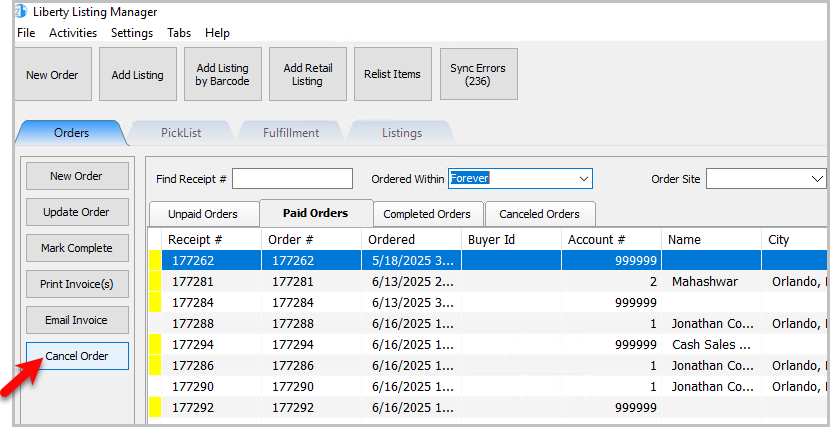
- In the Listing Manager you can click Cancel Order on the left-hand side.
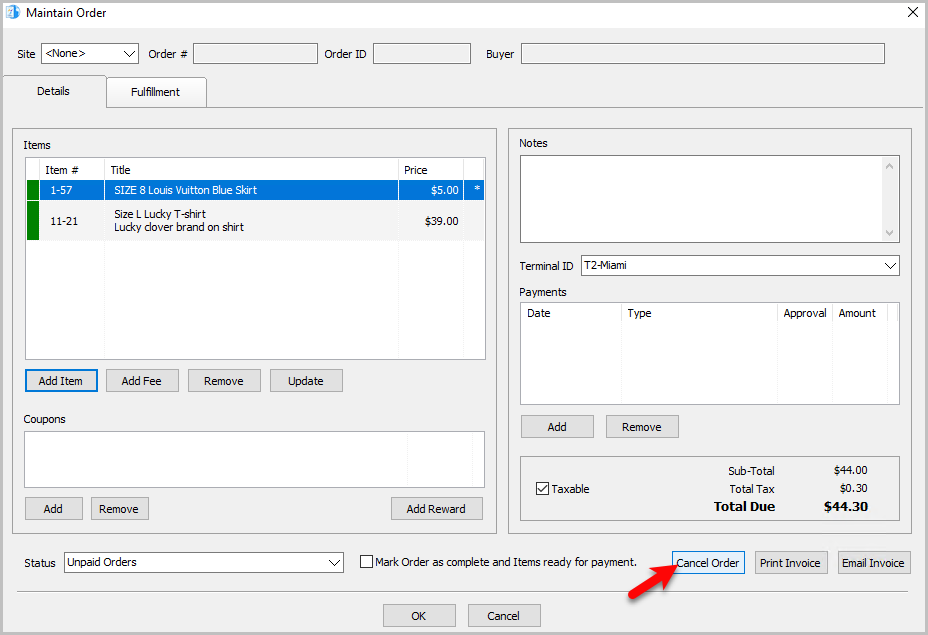
- If you have the order opened up you can also cancel the order there.


Viewing Canceled Orders Tab
You can view a list of canceled orders as well with the Canceled Orders Tab

Note: You cannot cancel an order with a payment associated with it.
Next Section Navigation Link
Click the following link to see a list of articles for the next section:
Maintaining An Order
Related Topics
How To Cancel An Order In Listing Manager Adding A Manual Order Mark Multiple Orders as Complete Simultaneously Marking An Order As Complete Order's Tab Overview How To Refund An Order Specific To The Listing Manager Refunding An Order Through Shopify View Pending Orders Changing The Account Used For the Fulfillment Of An Item