Getting to the Fulfillment Tab and Controls
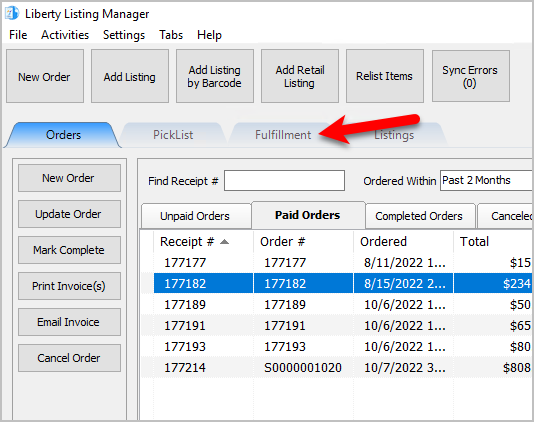
- Open the Liberty REACT Listing Manager and click on the Fulfillment tab.
- Click on the Location drop-down to select which location you would like to work with.
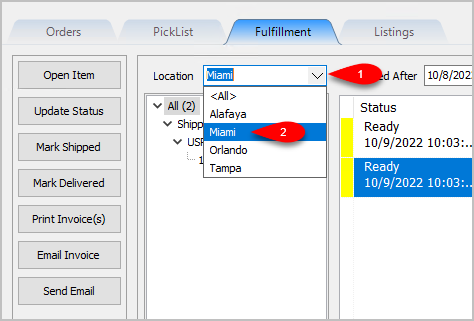
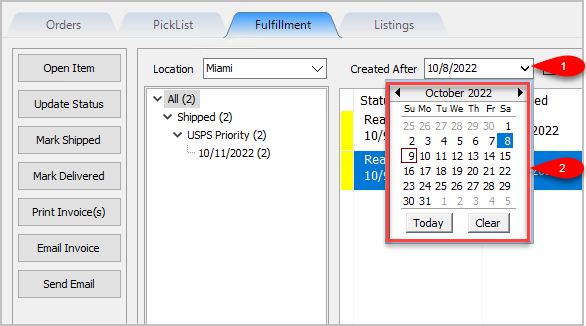
Note: It is not recommended that you select the <All> option if you have multiple store locations. - Click on the Filter Date checkbox if you want to see orders within a specific time period. For the Created After date drop-down, select the after date you would like to view items entered for
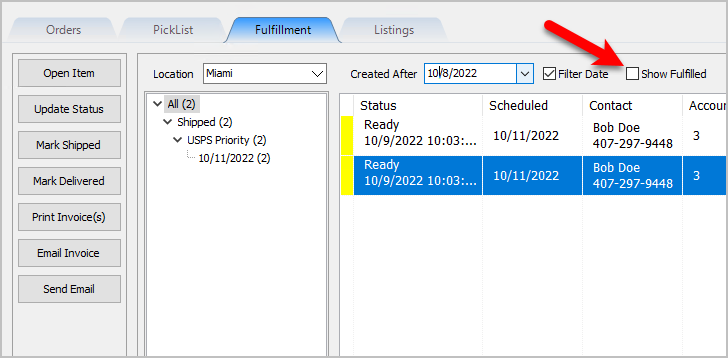
- Select whether you want to show Orders/Packages that have already been Fulfilled.


Next Article In Section
Click the following link to move to the next article in this section:
Changing Fulfillment Status Detail From The Fulfillment Tab
Related Topics
Getting to the Fulfillment Tab and Controls Fulfillment Tab Overview Changing Fulfillment Status Detail From The Fulfillment Tab Quickly Mark A Ready To Ship Order As Shipped From The Fulfillment Tab Quickly Mark A Ready To Deliver Order as Delivered From The Fulfillment Tab Printing An Invoice From The Fulfillment Tab To Be Included In A Package Emailing An Invoice From The Fulfillment Tab Sending A Custom Email To The Customer That Placed An Order Adding An eBay Description Adding Images To An eBay Listing Definitions of Ebay Description Processor Buttons