Account Management Feature
The following video chapter contains setup information on this topic:
https://www.youtube.com/watch?v=bm9YPwazle0&t=306s
The Account Management feature allows your consignors to edit their own account in Liberty without needing to speak with an employee of the store. They can also view and sign the Store’s Consignor Contract.
It is important to note that in order for a consignor to have access to their account with the Liberty Kiosk App the store needs to have the Consignor Login service. This is because the Account Management feature uses their login info to bring up their account information.
If a consignor has never signed into their Consignor Login account before, they will need to change their password outside of the Liberty Kiosk App.
Once this has been done, they can then sign into the Liberty Kiosk Account Management feature and access their account.
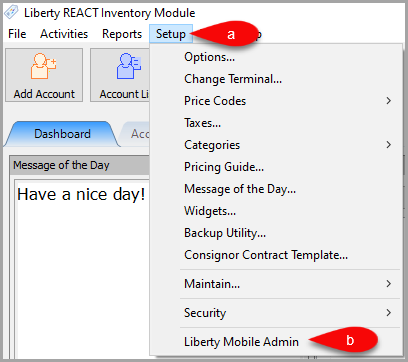
- Open Liberty and then click Setup and then Liberty Mobile Admin.
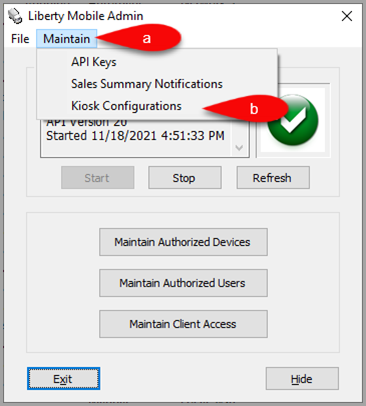
- Click Maintain and then Kiosk Configurations.
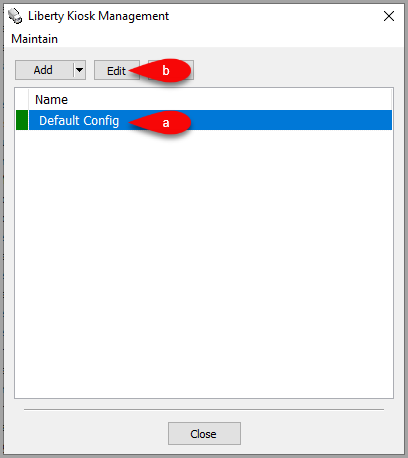
- Select the Configuration you want to edit and then click the Edit button.
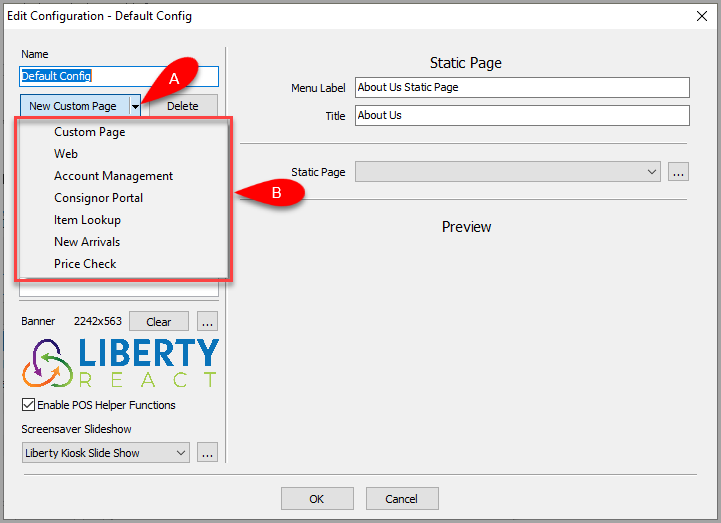
- Click the dropdown for New Custom Page, then select the Account Management option.
- You can now configure the Account Management feature which will add a panel within the Liberty Kiosk App.
You can check or uncheck the section header boxes to set whether you want the section to appear in the Panel.
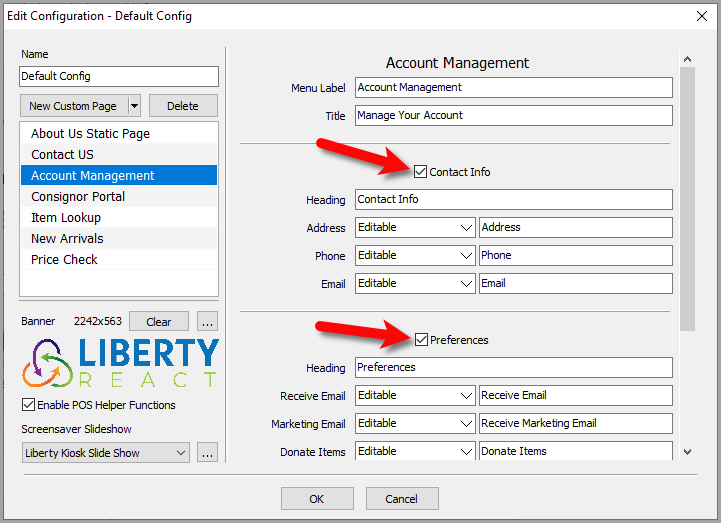
- Here is part 1 of the options you can change for the Account Management feature.
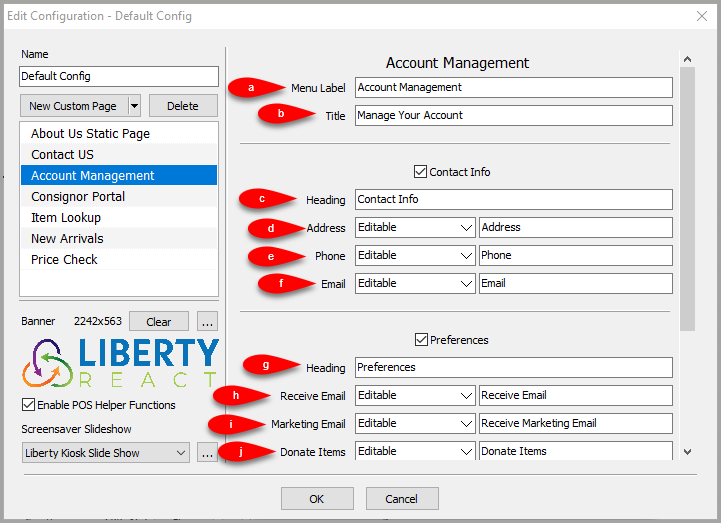
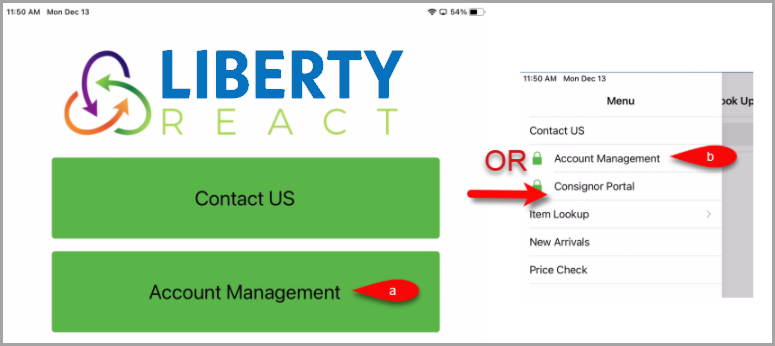
- Menu Label: This is the feature menu label that appears in the Liberty Kiosk App
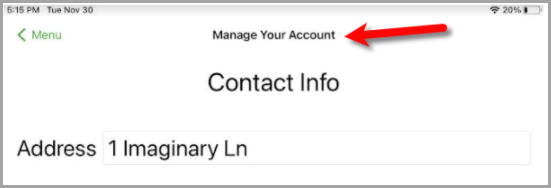
- Title: Title of the page when shown in the Liberty Kiosk App.
- Heading: The heading that appears in the Liberty Kiosk App for the Contact Info section.
- Address: Controls whether the Address field is Read Only, Hidden or Editable and what the field title reads.
- Phone: Controls whether the Phone field is Read Only, Hidden or Editable and what the field title reads.
- Email: Controls whether the Email field is Read Only, Hidden or Editable and what the field title reads.
- Heading: The heading that appears in the Liberty Kiosk App for the Preferences section.
- Receive Email:Controls whether the Receive Email field is Read Only, Hidden or Editable and what the field title reads.
- Marketing Email: Controls whether the Marketing Email field is Read Only, Hidden or Editable and what the field title reads.
- Donate Items: Controls whether the Donate Items field is Read Only, Hidden or Editable and what the field title reads.
- Here is part 2 of the options you can change for the Account Management feature.
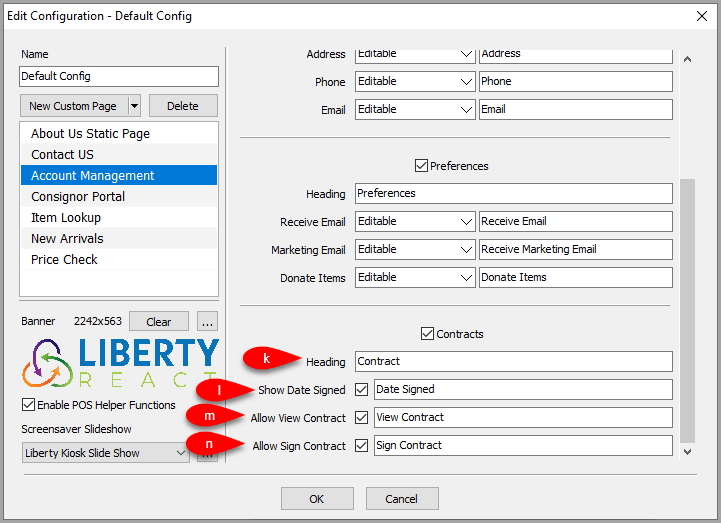
- Heading: The heading that appears in the Liberty Kiosk App for the Contracts section.
- Show Date Signed: Checkmark box that controls whether Date Signed appears in the Liberty Kiosk App and what the field title reads.
- Allow View Contract: Checkmark box that controls whether consignors can View Their Signed Contract in the Liberty Kiosk App and what the button title reads.
- Allow Sign Contract: Checkmark box that controls whether consignors can Sign Contracts using the touchscreen of the iPad and what the button title reads.
- Here are some examples of what the consignor’s can see for Account Management on the Liberty Kiosk App:


Note: As a reminder, the store must have the Consignor Login service and the consignor must sign into their Consignor Login account in order to be able to edit their account information and also to view and sign the Store’s Consignor Contract.

Next Article:
We are now ready to add the Consignor Login feature to the Liberty Kiosk app.
Click the following link to continue:
Next Article In Section
Click the following link to move to the next article in this section:
Consignor Portal Feature
Related Topics
Account Management Feature Consignor Portal Feature
Custom Page / Static Page Feature Web Feature Consignor Portal Feature Item Lookup Feature New Arrivals Feature Price Check Feature Setting Up The Customer Facing Display Mode Liberty Kiosk Using the Customer Facing Display Kiosk Signature Capture Overview