How To Use Find Variant To Add Retail Variant Items
Existing Retail Items with a similar brand can be added to another added or edited Retail Item by using the Find Variant button.
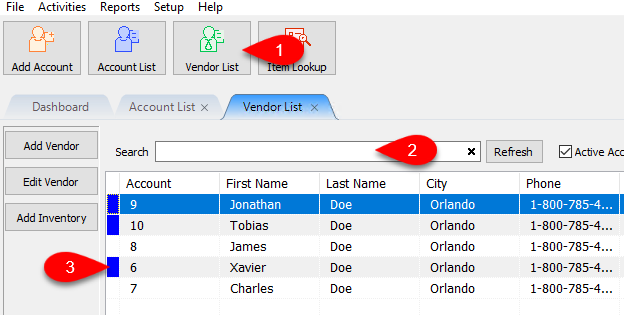
- Click on the Vendor List, then Search for the account you wish to open.
Once you have found the account you want to open, double click on it.
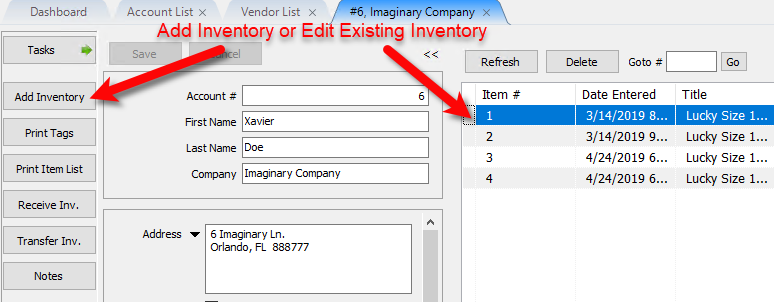
- You will need to Add Inventory or Edit and existing item.
You can double click on one of the under the inventory area of the account to edit an item.
- If you are entering another retail vendor item, please visit the following articles for information on how to create new retail vendor inventory:
Adding Retail Vendor Inventory
Receiving Retail Vendor Inventory
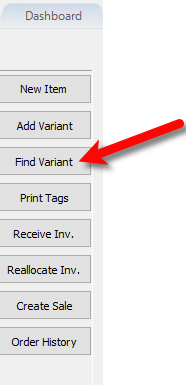
After you have added another retail inventory item and received inventory or edited an existing retail inventory item, click the Find Variant item.
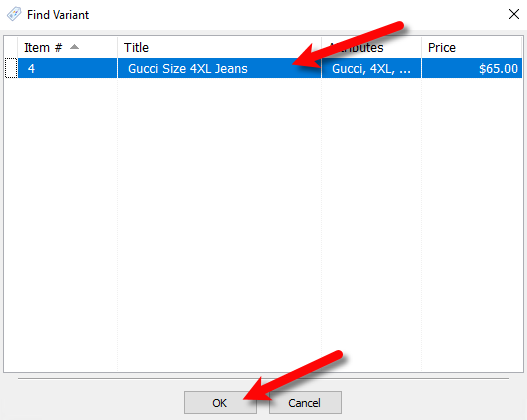
- The Find Variant list box will appear showing all non-retail variant items that contain the same brand.
You may now select which item you wish to add as a variant and click the OK button.
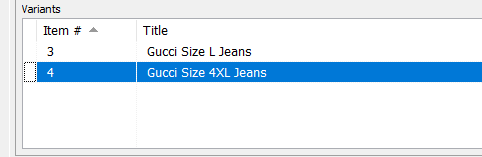
- If you look towards the bottom variant section, you will notice that the new variant is now added.


Next Article In Section
Click the following link to move to the next article in this section:
Enter Sale Dates for Retail Items
Related Topics
How To Use Find Variant To Add Retail Variant Items Item Entry Windows - Overview Add Retail Items to Inventory Edit Retail Items Receive Retail Inventory How To Add Retail Variants Creating a Shopify / ShopRW Listing With One Variant Type Creating a Shopify / ShopRW Listing With Two Variant Types Copy Retail Items Delete Retail Items Enter Sale Dates for Retail Items