How To Process Inventory For A Pre-Paid Buy
After you have added either a Cash or Trade transaction to the account for the Pre-Paid Buy, you can then Add Items as part of the Buy at your convenience. At the end of Adding Items, you will be prompted to Process the items so that they can be sold in the Point of Sale. Until you process the items, the items cannot be sold.
You can add the items for the Pre-Paid Buy, but choose to process them later at your convenience.
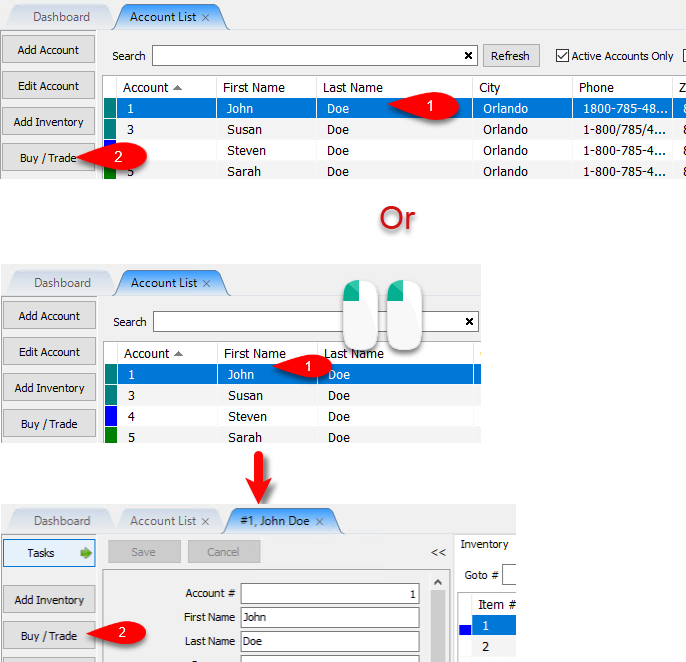
- From the Account List, select the account, then click on Buy / Trade.
Or
Open the Account first and then click on Buy / Trade.
- Make sure you select the status and then select the Pre-Paid Buy and click on Process.
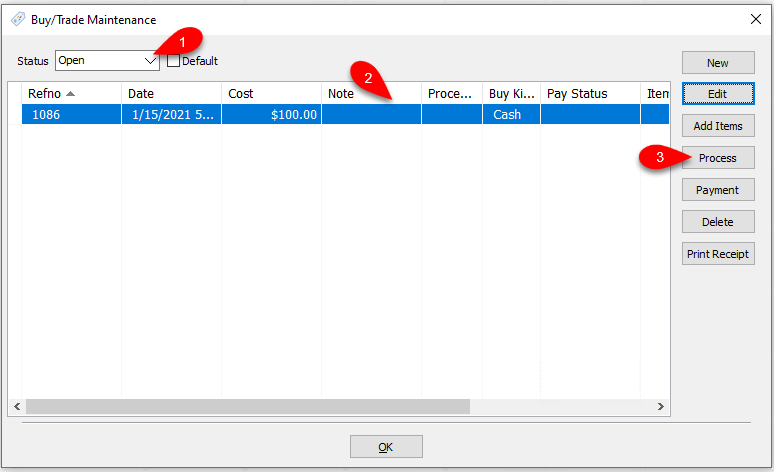
- The Pre-Paid Buy Items will then be processed and immediately available for sale, in the Point of Sale.


Next Article In Section
Click the following link to move to the next article in this section:
Printing A Receipt for a Processed Pre-Paid Buy
Related Topics
How To Process Inventory For A Pre-Paid Buy Pre-Paid Buys Overview Turning on Pre-Paid Buys Creating A New Pre-Paid Buy Creating A Payment For Pre-Paid Buy Adding Items For A Pre-Paid Buy Printing A Receipt for a Processed Pre-Paid Buy How To Edit A Pre-Paid Buy How To Delete a Pre-Paid Buy That Has No Cash or Trade Transaction Added How To Add Your Own Pre-Paid Statuses Using the Wishlist