Printing A Drop-Off Receipt
You have the ability to print Drop-Off Receipts for your consignors when they provide items for a Consignor Drop-Off.
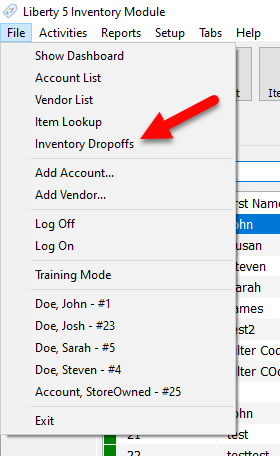
- Go to File > Inventory Dropoffs.
- To do this, first select the drop-off you wish to print a receipt for in the Inventory Dropoffs panel, then on the right hand side, then click the Print Receipt.
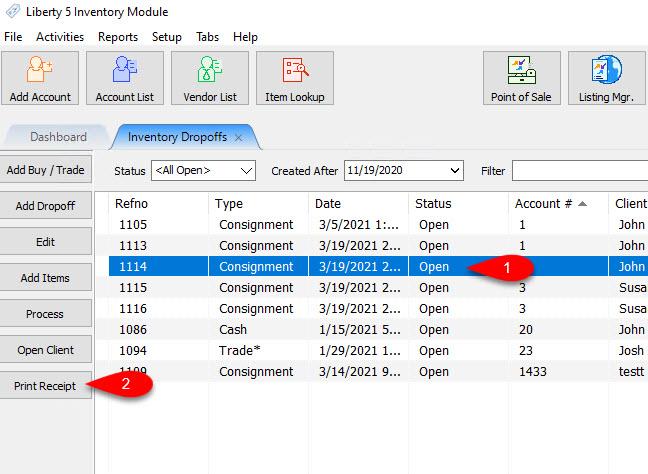


You can then print the drop off receipt from the top left by clicking on the Print icon.

Set Receipt Printer For Drop Off Receipts
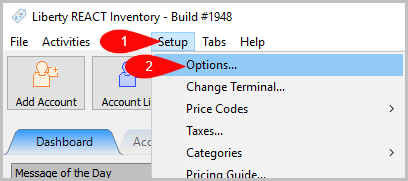
- Go to Setup > Options
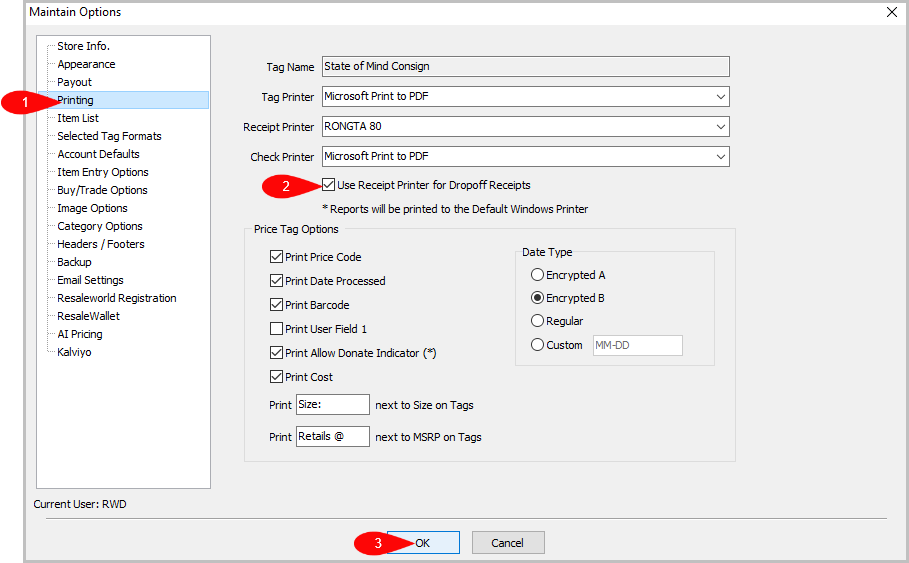
- Then go to Printing. Turn on Use Receipt Printer for Dropoff Receipts then press OK.


Next Article In Section
Click the following link to move to the next article in this section:
Filtering inventory dropoff
Related Topics
Printing A Drop-Off Receipt Adding A Consignment Drop-Off Adding Items To A Consignment Drop-Off Dropoff List View Editing A Consignment Drop-Off Filtering inventory dropoff Consignment Inventory Dropoffs Overview Processing a Consignment Drop-Off Using the Wishlist Wishlist Cross-Reference report Looking for Wishlist Matches While Adding Items