Table of Contents
Setting Up Your Quickbooks Company File
- Open the Quickbooks application and select your Company File if Quickbooks does not automatically open it.
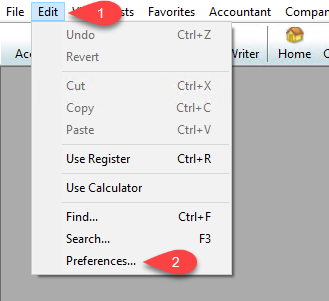
- Click the Edit menu option and then click Preferences…
- Click on the Accounting option to the left, then click on Company Preferences.


Make sure that Use account numbers, Require accounts and Use class tracking are all checkmarked.
Then Click the OK button.

Next Article In Section
Click the following link to move to the next article in this section:
Exporting To Quickbooks Desktop Software For The First Time
Related Topics
Setting Up Your Quickbooks Company File Exporting to Quickbooks Desktop Software Using The Quickbooks Link Overview Company File Selection and GL Account Settings Exporting To Quickbooks Desktop Software For The First Time How To Initiate Subsequent Syncs To Quickbooks Desktop Software How To Use The Quickbooks Link To Export To Quickbooks Desktop How To Use The Quickbooks Link To Export To Quickbooks Online How Transactions Flow From Quickbooks Link to Quickbooks How To Export To Subaccounts Using The Quickbooks Link Exporting To Quickbooks Online For The First Time Exporting to Quickbooks Online Using The Quickbooks Link Overview