Table of Contents
Trade Items Overview
Here is the video that covers this content:
Trading Basics
Trade is a basic economic concept involving the buying and selling of goods and services, with compensation paid by a buyer to a seller, or the exchange of goods or services between parties.
Trading profits are generated through buying at a lower price and selling at a higher price within a short period of time.
Trade Items are items that have been entered in Liberty which allow for the account to be credited in one of two ways - Cash Value or Trade Value.
Trade is a temporary state for an item, as the trade must be processed before the item can be sold (Items are set to be Purchased once a trade is processed).
For all items that are traded, Liberty will create a Store Credit transaction based on the Trade Value of the item. See below to understand of a Trade Value is calculated.
Liberty REACT Trading feature allows you to perform several functions.
- Take Trade - a calculated value that is based on the price of the item and the differential percentage for trade items. The calculation takes the cash value percentage of the price, then increases that percentage by the differentage for trade items, then uses that new percentage to calculate the trade value.
- Take Cash - a calculated value specified by an item’s Price Code. During item entry, if an item has a Cost/Net, this value will override the item’s price code split percentage.
- Consign Selected - if a consignor rejects to trade or take cash for an item, you can use this option to consign the item instead. This will change the purchase method of an item to Consign. You can also specify the price code this item should have by selecting the Consignment Price Code drop down.
This default can be changed under the Buy/Trade Options area in Setup > Options. - Delete - this will delete the item from Liberty.
- Reject Offer - if a customer declines to trade or take cash, you can use this option to void items that were created from the Buy / Trade feature.
Any consignor who wishes to Take Trade, they will receive Store Credit (non-payable money) towards their traded item with an additional incentive towards their Store Credit if the option is enabled in Liberty which is explained below.
Enhanced Trading Features
Liberty REACT has a feature called Differential Percentage For Trade Items, which works slightly different than the previous releases of Liberty. You can find this option under Setup > Options > Buy/Trade Options
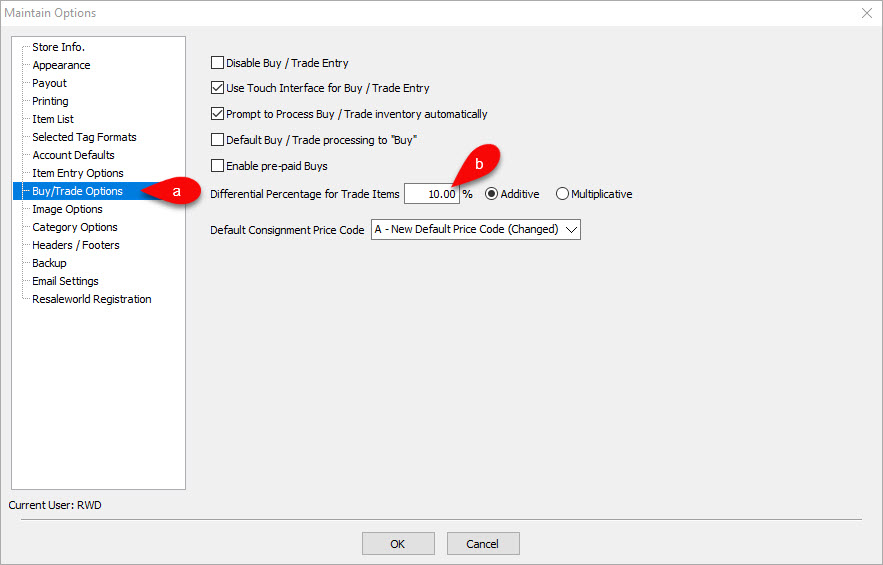
This option will provide the defined store credit bonus amount to the consignor when an item has been traded.
Additive vs Multiplicative Differential Percentage For Trade - Differential Percentage For Trade Items: This will provide a bonus in store credit to the consignor when selecting to receive payment in the form of store credit over cash.
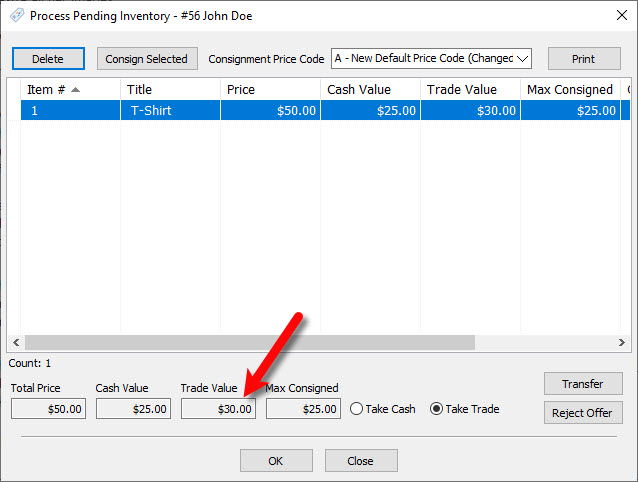
- Additive: With this option enabled, if you set the differential to 10%, then the trade value would be the price of the item multiplied by the trade differential percentage added to the cash value.
Additive Example: You have an item that is priced at $50.00. Your split is 50/50, meaning the cash value of this item when processed would be $25.00 to the client. The trade differential set to 10%, that would make the store credit trade offer $30.00.
Formula For Additive Trade Example:
Price * Split percentage = Cash Value
Price * Trade Differential = Additional Trade Value
Cash Value + Additional Trade Value = Total Trade Value
$50 * 50% = $25.00
$50 * 10% = $5.00
$25 + $5 = $30.00

- Price + Split Percentage = Cash Value
50 * .50 = $25.00 - Price * Differential Percentage = Additional Trade Value
50 * .10 = $5.00 - Cash Value + Additional Trade Value = Total Trade Value
25 + 5 = $30.00
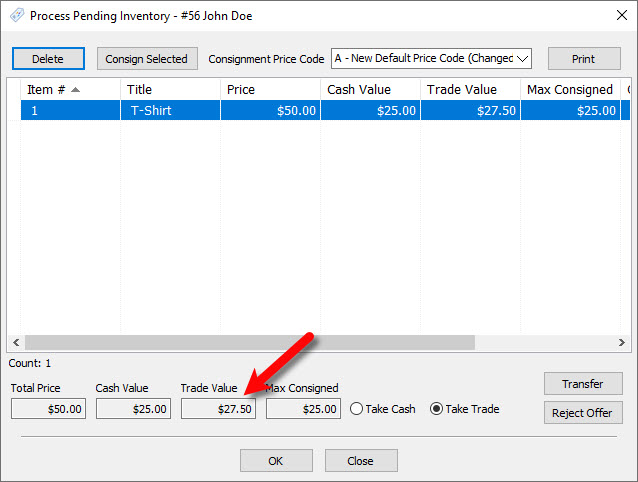
- Multiplicative: With this option enabled, if you set the differential to 10%, then the trade value would be 110% the cash value.
Multiplicative Example: You have an item that is priced at $50.00. Your split is 50/50, meaning the cash value of this item when processed would be $25.00 to the client. With the trade differential set to 10%, that would make the store credit trade offer $27.50.
Formula For Multiplicative Example:
Price * Split Percentage = Cash Value
Cash Value * Differential Percentage = Additional Trade Value
Additional Trade Value + Net to consignor = Total Trade value
$50 * 50% = $25
$25 * 10% = $2.50
$2.50+ $25.00 = $27.50
- Price * Split Percentage = Cash Value
50 * .50 = $25.00 - Cash Value * Differential Percentage = Additional Trade Value
25 * .10 = $2.50 - Additional Trade Value + Cash Value = Total Trade Value
- 50 + 25 = $27.50


Note: If an item has a Cost/Net amount set, this will override the calculation of the cash value and the new cash value of the item will be set to the amount specified under the Cost/Net field.
Next Article In Section
Click the following link to move to the next article in this section:
Trade Item Entry Process
Related Topics
Trade Items Overview How To Re-index the Database How Trade Items appear in the Transactions tab Buy and Trade Overview Process Trade Items How To Input Same day Trade Line Items Trade Item Entry Process Using the Wishlist Wishlist Cross-Reference report Looking for Wishlist Matches While Adding Items Wishlist Overview