Table of Contents
Merging Information into Documents
Use the Merge feature to combine data such as names and addresses from Liberty's client account database with information contained in Word Processor letters. For example you could use Merge to send the same letter to multiple persons, with each letter personalized letter with the individual's name and address.
Using Merge Fields
- From within Inventory Module select the Word Processor button.

The Word Processor dialog box will open.
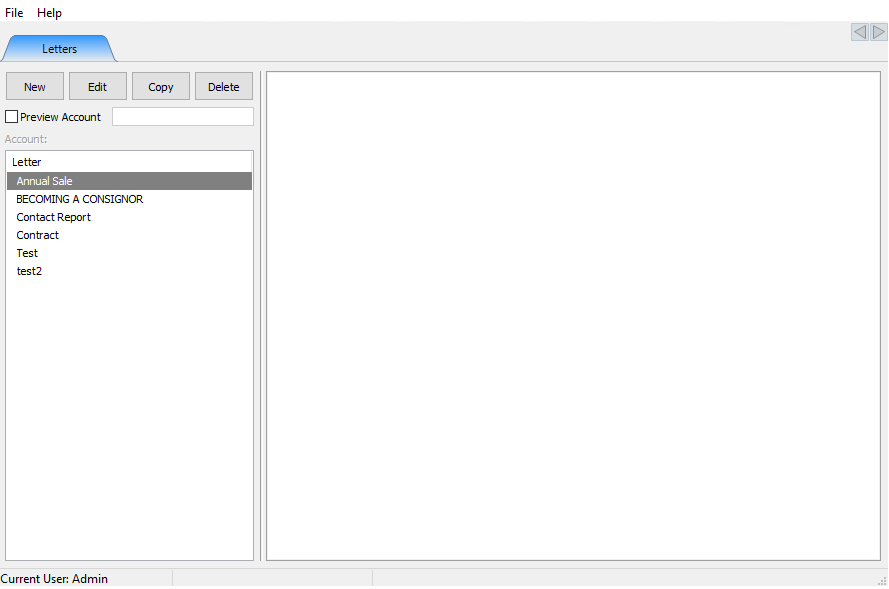
- Select the New button to create a new document, or select a current document and select the Edit button. This will open the document to be edited.
For this exercise, we are going to modify an existing document to so it is addressed to the consignor. We will be merging in the first and last name. There are many different Merge Fields all corresponding to the details of a consignor account. For more information on account details, see Add An Account. - To insert the First name, select Merge Fields > First Name.
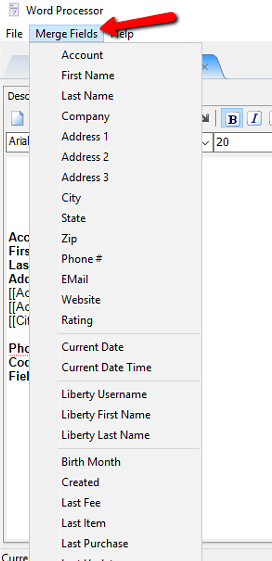
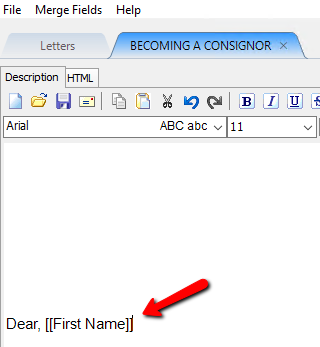
This will add the First Name Merge Field to the letter.
- To Add the Last name Merge Field, select Merge Fields > Last Names.
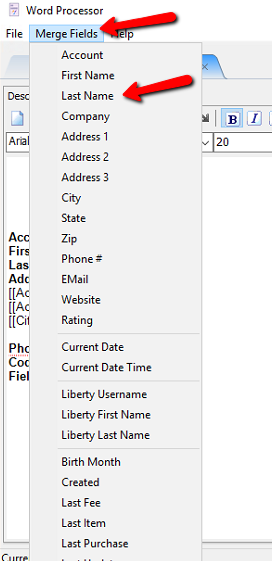


This will add the Last Name Merge Field to the letter.

Note: The Merge Field will appear wherever the cursor is when you select the appropriate field.
Note: If you prefer, you may type the Merge field into the text of your file as long as the format is perfect. In other words, typing CITY would work, but typing CITY without the brackets would not work.
Be sure to Save when done.

Next Article In Section
Click the following link to move to the next article in this section:
Print Merged Letters from Client Accounts
Related Topics
Merging Information into Documents Add an Account Printing or Emailing A Letter Using The Publishing Wizard Print Merged Letters from Client Accounts Converting Older Letters Creating A New Word Processor Letter Editing Documents Previewing a Letter Word Processor Overview Accessing Liberty Help From Anywhere In Liberty