Table of Contents
Types of Widgets
Chart Widget
With the Chart widget, a user can specify what type of chart to use. For more information see Adding A Chart Widget.
There are 5 different chart types:
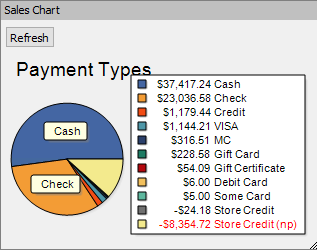
- Payment Types : shows a pie chart with all payment types and their total dollar value for each.
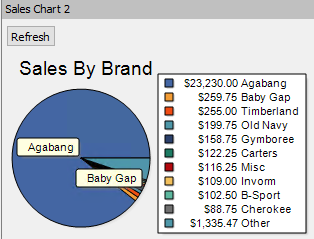
- Sales by Brand : shows a pie chart with all Brands listed and their total dollar value for each.
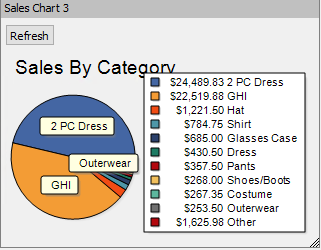
- Sales by Category : shows a pie chart with all Brands listed and their total dollar value for each.
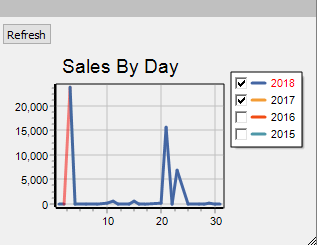
- Sales by Day : shows a line chart where you can select a year on the widget and see total sales fluctuations per day.
- Sales by Month(Line & Bar Chart) : shows a line chart where you can select a year on the widget and see total sales fluctuations per month.
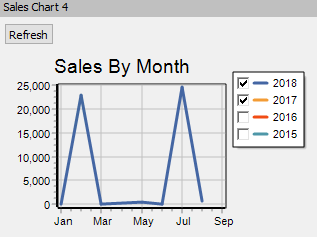


All of the chart widgets show relevant information that will be displayed in the Dashboard of Liberty.
Reminder Widget
The Reminder widget allows you to set, edit and remove reminders. For more information see Adding A Reminder Widget.

You can specify the following criteria:
- Account : choose an account to specify a reminder for that specific account.
- Description : provide a description for the reminder.
- Priority : specify low, medium, or high priority.
- Due Date : set the due date for the reminder.
Message of the Day Widget
The Message of the Day widget allows you to add a unique message to the widget and assign it to a specific group of users. For more information, see Adding A Message Of The Day Widget.

You can specify the following criteria:
- Description : provide a description for the message.
- Message For : set the user type that this messages applies to (i.e Clerk, Manager, Admin, Everybody).
- Start Date : beginning date for the message to show.
- End Date : end date for the message to close.
- Priority : specify low, normal or high priority.
Recurring Fees Widget
The Recurring Fees widget displays all of the accounts that currently have a recurring fee interval set in Liberty. With this widget, you can create Recurring Fee Types where you can specify a Description, Transaction Type, Amount, Fee Frequency. It has a unique feature where it allows you to see all the accounts that are currently on a Recurring Fee Cycle, and process a fee within the widget. Once the fees have been processed, they will show under the accounts Transaction section. For more information, see Adding A Recurring Fees Widget.

Recurring Fees Options

- Description : the name of this widget.
- Transaction Type : the type of transaction that will be posted on consignors account. The transaction will always be a deduction transaction, but you can specify if it’s a payable transaction and set a Quickbooks G/L Account.
- Amount : total amount of the fee/deduction.
- Fee Frequency : specify how often this transaction should happen (i.e 30 days, 90 days, Yearly).
Next Article In Section
Click the following link to move to the next article in this section:
Adding a Widget