Table of Contents
Pay Multiple Accounts
Here is the video that covers this content: How to Process Payouts in Mass
The Accounts Payments routine lets you print payouts for virtually any group of accounts, and can be used to print either a batch of checks or cash statements. Since batch statements are rarely done the routine is called Check Preparation. Once the payouts have been posted, inventory items are updated in the Transaction History and the payouts are recorded in the account's Payout History.
Warning: Once performed the Account Payments process cannot be reversed. We strongly recommend you perform a full backup immediately before every group payout, as the only viable way to fix the problem is to restore from backup and start over.
Note: Performing a batch payout is a multiple step operation. Depending on the number of payouts to be printed, this operation can take from 2 minutes to 2 hours or more.
Note: Items designated as consigned are payable only after they are sold. Items designated as purchased outright are immediately payable.
To Pay A Group Of Accounts
- Run a backup. (This is because the Account Payments process cannot be reversed once it has been performed. Thus if a mistake is made the only way to fix it is to restore from backup) If you are operating on a network and wish to be safe you should also run Account Payments when no one else is using Liberty.
- From the main menu, click on Activities > Accounting > Account Payments.
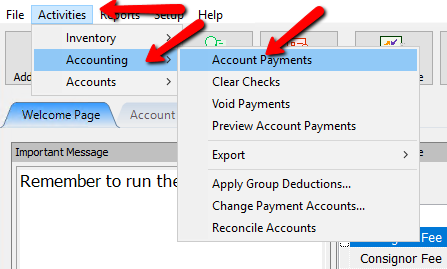
The Prepare Account Payments dialog will display.
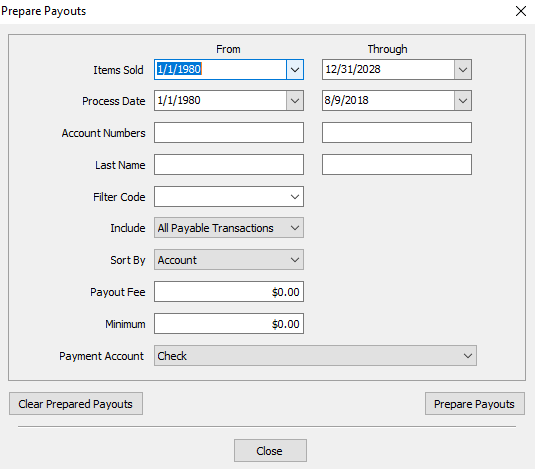
- Enter the necessary parameters for the Group Payout in the Prepare Account Payments dialog. Refer to the information below to learn more about the fields in this dialog.


Prepare Account Payments Dialog Fields
- Items Sold : Use these fields to limit the payment to include only specific dates. To place a hold on a transaction or transactions so a consignor is not paid for a specific item at this time, see the section entitled Transaction History.
Note: If you only payout a minimum amount each time, it is recommended to keep the Items Sold From field as is. - Process Date : Use these fields to limit the payment to include only items that went on the floor during a specific time period.
- Warning! If you only pay for items once during a specific time period, e.g. the previous months sales, and also specify a minimum check to print, be aware that by doing this it is possible that on occasion some Account Holders may not be paid for some items.
- Take the following example as an illustration: Today is August 10th, and checks are being printed only for sales occurring between July 1 - July 31. A minimum check amount of $10.00 is specified. Any consignors with total sales which net them less than $10.00 will not receive a payment from this check run. If on September 10th checks are printed for sales occurring only from August 1 - August 31, the consignor will not receive any money for the sales made during July.
- THIS IS NOT A SOFTWARE PROBLEM. This simply illustrates a potential problem which has been encountered in the past. It shows how important it is to consider all the ramifications of the steps taken when specifying check printing and report parameters. Please see the note in Items Sold.
- Account Number : Enter the range of account numbers to pay. If you leave these fields blank, the system assumes you wish to pay all accounts.
Note: If you will be running a large amount of checks, it is recommended to break the payouts into account groups. This is will cause less issues if your printer has any issues. - Last Name : Enter the range of accounts' last names to pay. If you leave these fields blank, the system assumes you wish to pay all accounts.
- Filter Code : Select a Filter Code if you wish to pay only those accounts containing the Filter Code selected.
- Include : Choose whether to include All Payable Transactions (items sold, deductions, credits, etc.) or just Items Only in the payouts.
- Sort By : Select the order in which payouts are to be printed: Account Number or Last Name.
- Payout Fee : Enter the Payout (Check) Fee, if any. The amount of this fee will be deducted from the payment.
See Set Payout Preferences to set or change the default Check Fee. - Minimum : Enter the minimum amount for which a payment may be made. If the account holder is owed less than the amount entered no payment will be made.
See Set Payout Preferences to set or change the default Minimum. - Payment Account : Select the Bank Account to pay from or select a cash account if paying the account holder in cash.
Note: when paying multiple accounts, only accounts that have been set for the payment account will be paid. In other words, an account with the default payment account set to Cash will not be paid when paying multiple accounts by Check. See Set Up Payment Accounts for more information. - Print Preliminary Register : When the Continue button is selected a Preliminary (Payout) Register report is generated. Choose whether to print a register containing Full Detail or just a Summary.
Note: It is imperative to close this report out even if you do not print it. Leaving it open will inhibit you from continuing to the next screen. - Clear Prepared Payouts : Select this button if a Check Run was previously prepared but not posted, and the parameters of this Check Run are meant to replace those of the previously Check Run.
- Close Button : If you press the close button, it will close the Prepare Payouts screen, saving your data as it was. When you go back to do the Multiple Payouts, it will pick up where you left off.
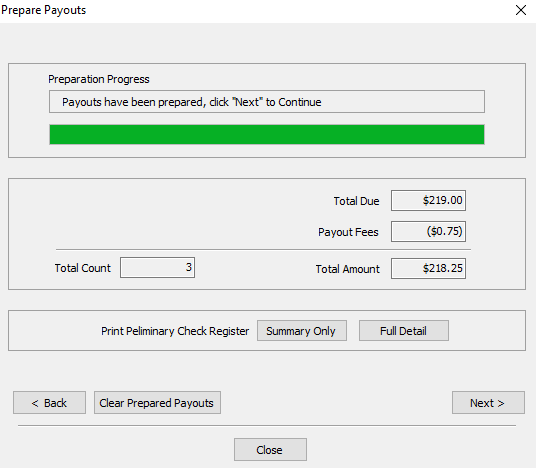
- Press the Prepare Payouts button when all the criteria has been entered.
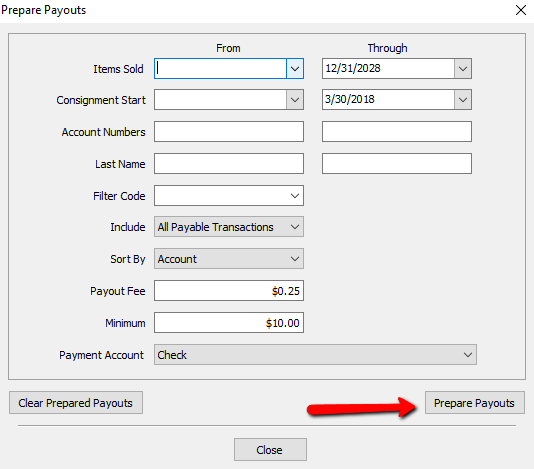
The next screen will give you the following information on the payouts to be performed.- Total Due : The total payable amount owed to consignors.
- Payout Fees : The total that will be deducted from the Total Due for Payout Fees.
- Total Amount : The total amount to be paid out minus the Payout Fees.
- Total Count : Total number of checks to be printed.
- Preliminary Check Register : The Preliminary Check Register has 2 options for printing.
- Summary Only button : Will display just the name of the Payee, the Check Number, and the amount to be paid.
- Full Detail button: Will display the name of the Payee, the Check Number, Amount to be paid, All the all the items included in that payout.
Note: The preliminary check report will not display automatically. You will have to select either the Summary Only Button or the Full Detail Button. - Back button : If you feel the data is incorrect, you can press the Back Button to go back a step.
- Clear Prepared Payouts button: Will clear out the payouts completely and will result in having to start over from the beginning.
- Close button : If you press the close button, it will close the Prepare Payouts screen, saving your data as it was. When you go back to do the Multiple Payouts, it will pick up where you left off.
Note: If there is a Multiple Accounts Payout in progress, you will not be able to perform an individual payout for an account. You will need to finish the Multiple Accounts Payout, of Clear the Prepared Payouts. See Pay One Account At A Time.
- Click the Next button to continue.
- Enter the necessary parameters for the Group Payout in the Print Account Payments dialog. Refer to the information below to learn more about the fields in this dialog


Print Account Payments Dialogue Screen
- This Is The Initial Check Run : By default, this is the radio button selected. This indicated this is the first time we are running this check run.
- This Is A Restart : This radio button indicates we had an issue with the first attempt at the check run, and we need to restart from a certain check number. This feature is used in conjunction with Last Good Payout Number.
Note: If This Is A Restart is selected, you will need to enter the Last Good Payout Number to indicate to Liberty the last check that printed without issue. You will also need to enter a new Starting Payout Number so Liberty knows what is the next check in the printer. Liberty will automatically skip the numbers between Last Good Payout Number and Starting Payout Number. - Starting Payout Number : The number of the first check or cash statement to be printed. The system remembers check and statement numbers, so entering a new number is usually unnecessary.
- Last Good Payout number : This is only used when a print run fails to print the checks properly. Select the radio button for This Is A Restart.
- If you need to restart, Select the This is a Restart radio button. The Starting Payout Number dialog will change to Next Payout Number to Print.
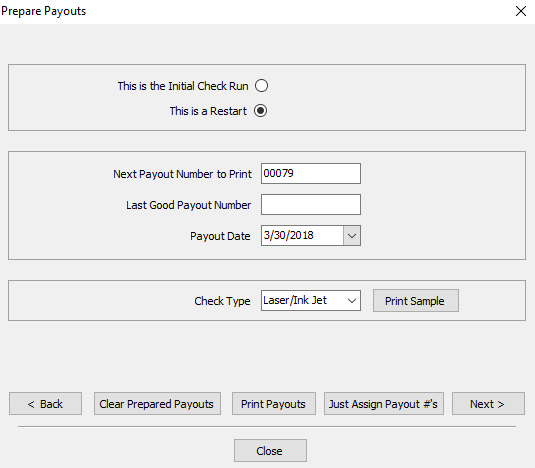
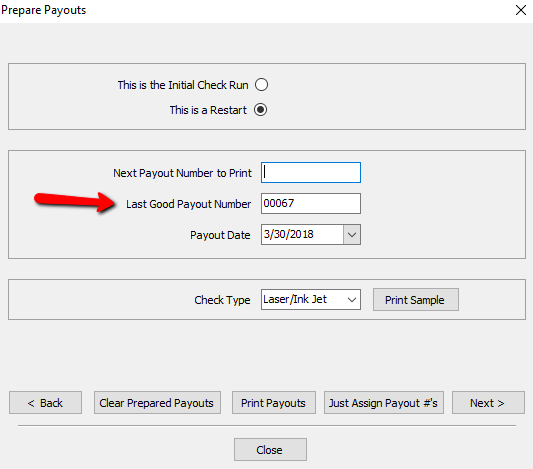
- Enter in the Last Good Payout Number
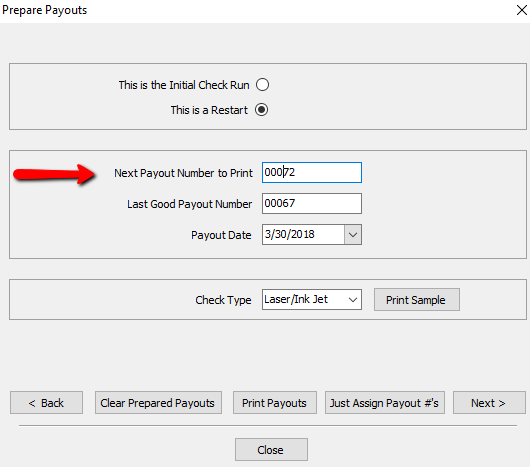
- Enter in the Next Payout Number to Print.
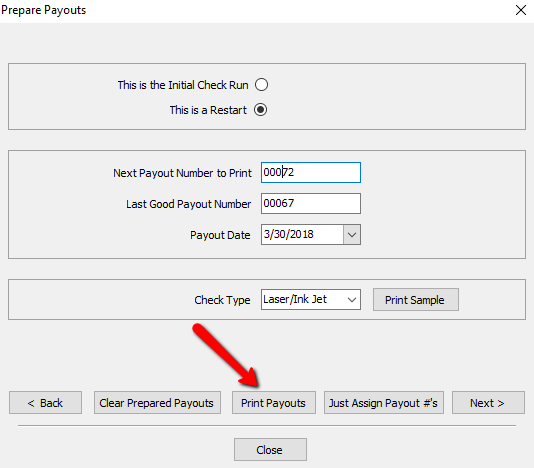
- Click Print Payouts at the bottom.
- Payout Date : Enter the date to be printed on the checks.
- Check Type : If paying by check, select the type of check.
- Quickbooks : Quickbooks checks have a check at the top of an 8½ x 11 page, and two stubs below.
- Laser/Inkjet : laser/Inkjet checks have a check in the middle of an 8½ x 11 page, with a stub above and a stub below.
Note: Contact Resaleworld to order checks for use with Liberty. Checks ordered from Resaleworld are guaranteed to work with Liberty. Checks ordered from other sources may not work. See Ordering Computer Checks from Resaleworld for more information. - Print Sample button : Select this to print a sample check. This is useful to make sure checks are lined up and the printer is working properly. (No inventory information will be printed on this sample check).
- Back button : If you feel the data is incorrect, you can press the Back button to go back a step.
- Clear Prepared Payouts button: Will clear out the payouts completely and will result in having to start over from the beginning.
- Close button : If you press the close button, it will close the Prepare Payouts screen, saving your data as it was. When you go back to do the Multiple Payouts, it will pick up where you left off.


- There are two options to continue from here.
- Print Payouts button : Select to start printing payouts on the printer.
- Just Assign Payout #’s : Select this button when checks are to be posted but not printed. An example of when this would be used is when payouts are handwritten.
Choosing just one of the two options will take us to the next screen.

Post Payouts Dialogue Screen
- Print Check Summary Report : Select to print a report summarizing the payouts.
- Paying From Account : This field is just a reminder telling you the Payment Account used to do the Check Run.
- Number Of Checks : Is just a reminder of how many checks were printed.
- Total Amount : Is just a reminder of how much is being paid out.
- Post Progress Bar : Is just a visual indicator that something is happening when you attempt to Post The Payouts.
- Back button : If you feel the data is incorrect, you can press the Back Button to go back a step.
- Clear Prepared Payouts button: Will clear out the payouts completely and will result in having to start over from the beginning.
- Close button : If you press the close button, it will close the Prepare Payouts screen, saving your data as it was. When you go back to do the Multiple Payouts, it will pick up where you left off.
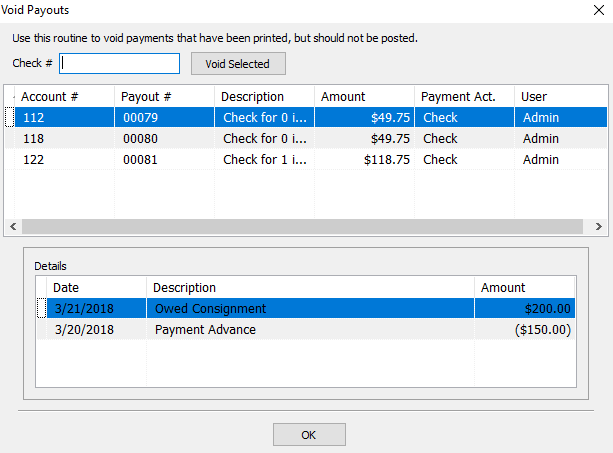
- Void Payouts button : This is used to void payments that have printed, but should not be posted.
Note: This will only need to be done if there was a problem printing the payouts.. See Void an Unposted Payment for more details.
- Post The Payouts : This is the Final Step to the Payout Process. Press Post The Payouts if you wish to finalize the payout process.
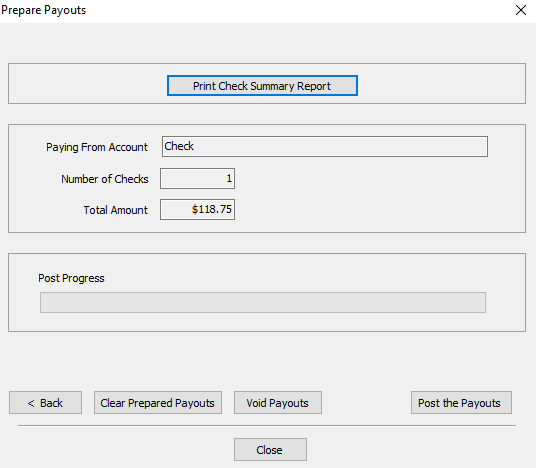


- The final step is the press the Post the Payouts button.
The Final Check register will generate. You can print this before closing.
Note: It is imperative to close this report out even if you do not print it. Leaving it open will inhibit you from continuing to the next screen.
Next Section Navigation Link
Click the following link to see a list of articles for the next section:
Account Management