Table of Contents
Consignor Contract Creation
Contracts can be generated in Liberty. Once it is generated, it can be saved and used over and over. Merge fields are available for generating a personalized contract for an account.
If you use Payment Logistics for integrated credit card processing, you can also capture their signature and attach it to the contract when the PDF is created. A copy is also uploaded to the cloud should you lose the local copy of the PDF.
Accessing A Contract Template
From the Inventory Module select Setup > Consignor Contract Template.
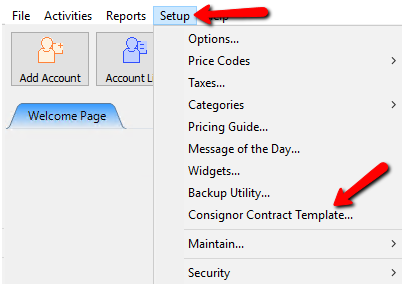
A blank contract will open.
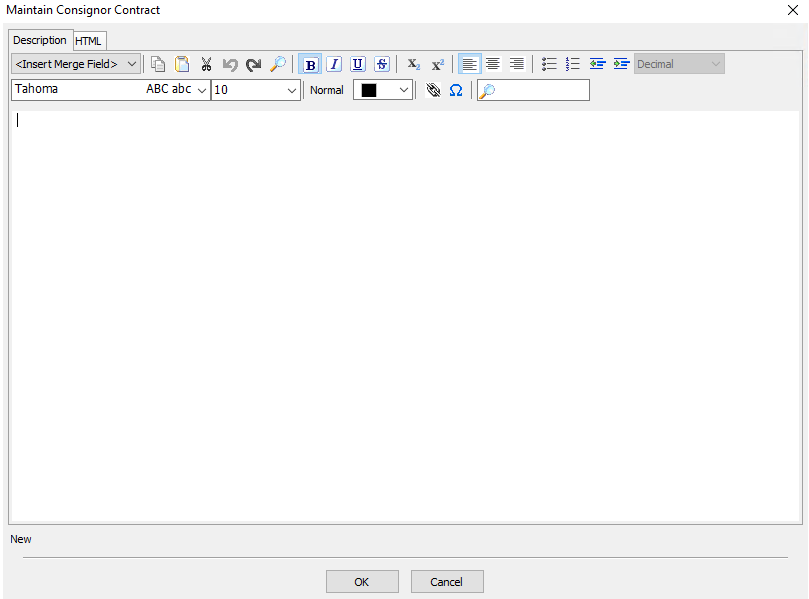
The first time opening the contract template it is blank. It would be virtually impossible for us to create a contract template for every store.


The Menu
The menu for creating a contract is standardized across most word processors. Highlighting your mouse over one of the icons will give you a popup telling you what that function is. Below is a list of the functions starting with the top row from left to right.
.

- Merge Fields : Merge Fields are discussed in detail below
- Copy : Copies the selected text to the clipboard. Text can also be cut and copied from other programs. Unlike Cut, the original text is NOT deleted.
- Paste : Inserts the contents of the clipboard to where the cursor is currently positioned. Use this after text has either been cut or copied. Text may be cut or copied from another program and pasted into your Liberty letter.
- Cut : Copies the selected text to the clipboard. Text can also be cut and copied from other programs. Caution: When you cut text, the original text is deleted from the letter.
- Undo : Reverses the most recent action taken. For instance, if you delete a paragraph, then immediately change your mind, select Undo to put the paragraph back.
- Find : Searches for specific defined text.
- Bold : Takes currently selected text and makes it bold. To select text, either Left click and drag the cursor over the text so that it is highlighted, or place the cursor at the beginning of the text you wish to select, press the Shift key, then press the Right Arrow key. Try using the other arrow keys, as well as the Home and End keys and watch what happens. Also try holding down the Shift key and the Ctrl key at the same time as you press any of the Arrow keys.
- Italics : Takes the currently selected text and makes it italic.
- Underline : Takes the currently selected text and underlines it.
- Strikeout : Takes the currently selected text and puts a line through it implying that the text is wrong and was recently deleted or marked as such.
- Subscript : Subscripts appear at or Below the baseline.
- Superscript : Subscripts appear at or Above the baseline.
- Left Alignment : Aligns all text to the left margin.
- Center Alignment : Centers all text evenly between left and right margins.
- Right Alignment : Aligns all text to the right margin.
- Unordered List : Organizes a list using Bullet Points.
- Ordered List : Organizes a list using Numbers.
- Decrease Indent : Moves the indented text to the left.
- Increase Indent : Moves the indented text to the right.
- Font Type Box : Select the font type box and from the dropdown, chose the font type you wish to use.
- Font Size : Select the font size box and choose the size of the font you wish to use.
- Header : Click the header dropdown and select from Normal to Header 5.
- Font Color : Click the font color drop down box and select a color for the font.
- Link : Use the Link button to insert a Weblink to an external source on the Web.
- Symbols : Selecting the Symbols menu will give you a list of symbols to select from.
- Search : using the Search field will search the document for what was typed in the search field.
Merge Fields
Use the Merge Fields feature to combine data such as names and addresses from Liberty's client account database to personalize the contract. For example you could use Merge Fields to include the client's name and address at the top of the contract.
Note: If you are using Payment Logistics integrated processing and wish to capture the signature then you must include the Signature field within the contract.

Signature Capture
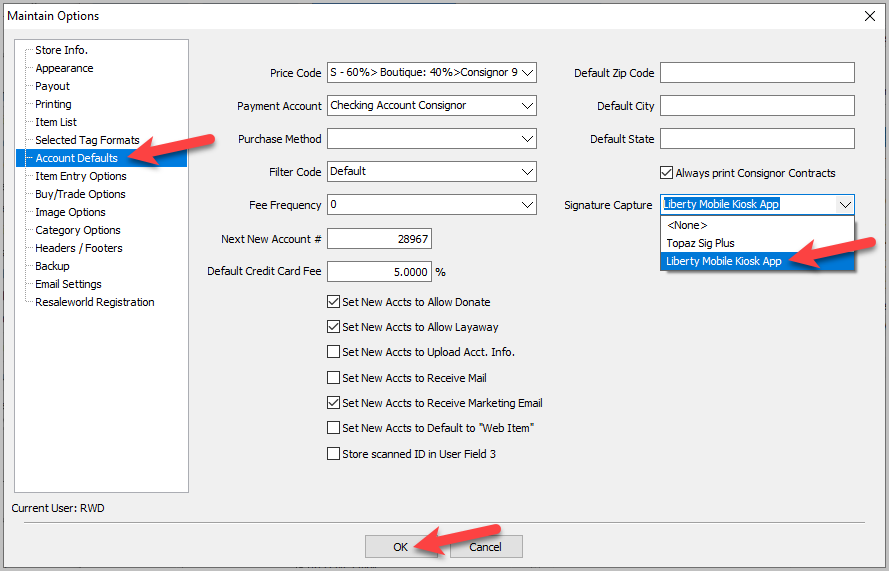
Liberty Kiosk as well as signature capture devices can be used for Signature Capture for Payouts or Contracts. This can be configured separately in the Inventory Module.
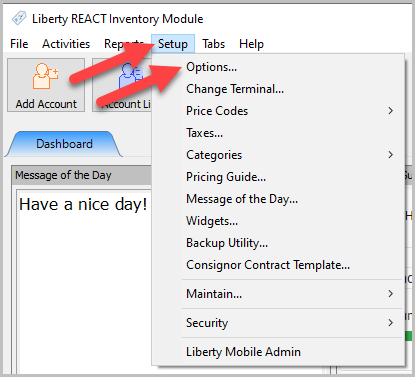
- Click Setup, then Options.
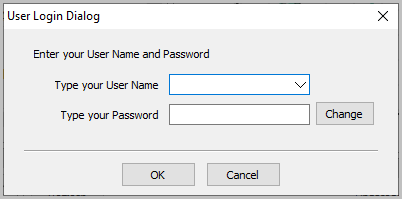
- Enter your username and password, then click OK.
- Select Account Defaults, then choose the signature capture device under the Signature Capture dropdown. Then click OK.


Next Section Navigation Link
Click the following link to see a list of articles for the next section:
Attributes