Table of Contents
Add, Change and Delete Attribute Types
Liberty comes with 1-3 Attributes already set up for most Categories. In addition there are several dozen Attribute Types already set up, and anywhere from 10-100 Attribute Values for each Attribute Type.
Attribute Values are used to further define the Attribute Type. For instance, an Attribute Type might be Color, which has the Attribute values of red, green, blue, brown, beige, etc.
Another Example: Attribute Values for the Attribute Type of Gemstone are diamond, ruby and emerald.
You may add, change and delete Attributes as needed.
Adding an Attribute Type
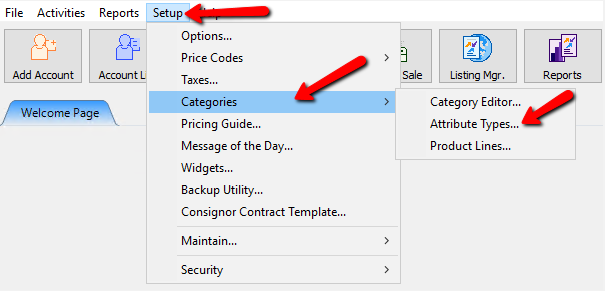
- From the Main menu, click on Setup > Categories > Attribute Types.
- Select the Add or Edit button.
- Enter or change the name of the Attribute Type in the Attribute Type dialog. The maximum length of the Attribute Type is 15 characters.
- Select OK.

To Delete An Attribute Type
Note: Once an Attribute Value belonging to an Attribute Type has been used to describe an item neither the Attribute Type nor the Attribute Value can be deleted.
- From the Main menu, click on Setup > Categories > Attribute Types.
- Select the Attribute Type to be deleted.
- Select the Delete button.
- When the Confirm window appears Select Yes.
Next Article In Section
Click the following link to move to the next article in this section:
Add, Edit and Delete Attribute Values
Related Topics
Add, Change and Delete Attribute Types Overview of Attributes Category Editor Add, Edit and Delete Attribute Values Assign Attributes Types to Categories Make an Attribute Inactive Change Order of Attributes on Item Entry Screen Printing the Size Attribute on Price tags Remove an Attribute from a Category Show Attributes in Item Titles Account Defaults