Table of Contents
Transaction Types
Transactions in Liberty are defined as either a deduction from, or a credit to, a consignor's account.
The Maintain Transaction Types window displays a list of all deductions and credits contained within Liberty. From here the type of transaction (deduction or credit) is specified along with the General Ledger (G/L) Account and Account Type for each Transaction Type.
Note: G/L information is used when linking with an accounting package such as QuickBooks.
Note: Fees assessed to customers (i.e. buyers or purchasers) are handled in the Price Codes under Setup > Price Codes > Price Codes.
While a number of Transaction Types are provided with Liberty, additional Transaction Types may be entered. Repair, cleaning, and dry cleaning fees are examples of transactions you might wish to create to deduct money from consignor accounts. Credits may also be created for the purpose of adding money to a consignor's account.
One Transaction Type to be familiar with is Payment Advance. Use Payment Advance when making a partial payment to an Account Holder. For instance, if an Account Holder is owed $50.00, and you wish to pay $20.00 instead, use Payment Advance as the Transaction Type.
You may add as many Transaction Types as you wish. It is recommended that separate Transaction Types be created for each type of deduction and credit. For example, if your store has three types of fees to be added - Dry Cleaning, Repair and Pickup - then you should create 3 separate Transaction Types, one for each (opposed to just one transaction to cover all three). The reason for this is that you will then be able to generate reports that break out each type of Fee on a separate line. This will allow for more precise cash flow analysis.
Accessing Transaction Types Maintenance Window
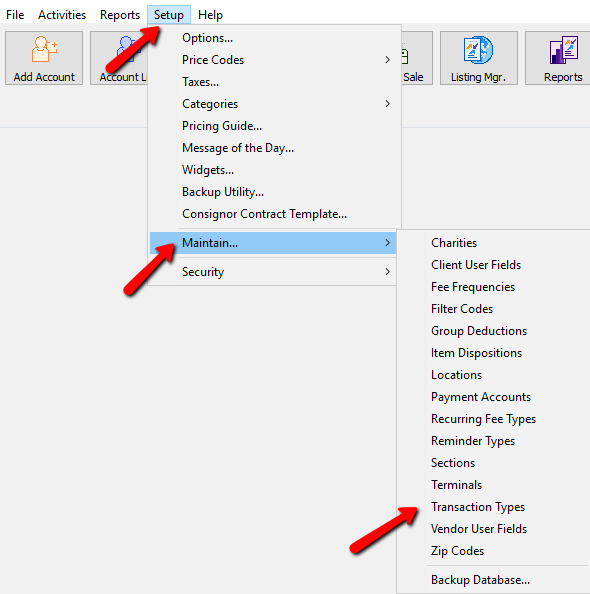
- Within Liberty select Setup > Maintain > Transaction Types.
The Maintain Transaction Types window appears.
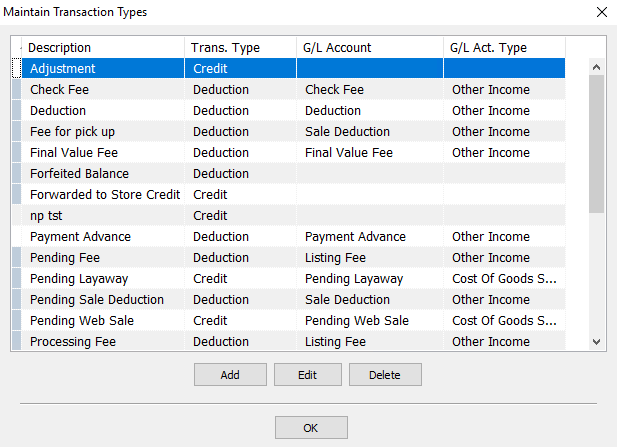
- Select the Add button to create a new Transaction, highlight and select the Edit button to modify an existing Transaction, or the Delete button to remove a Transaction.
Note: For audit control purposes, Transaction Types can only be deleted if they have never been used in a Transaction.
Selecting the Add or Delete button will bring up the details of the Transaction.
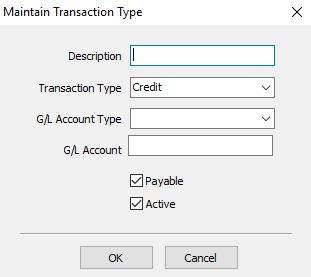
- Description : This description will appear in the Transaction History. Examples would include Dry Cleaning or Repair Fee. Do not use the term Deduction - this term is reserved for system use.
- Transaction Type : Use the dropdown to select the Transaction Type. Deduction or Credit.
- G/L Account Type and G/L Account : If you are using accounting software with Liberty, select the G/L Account Type and pu the appropriate General Ledger (GL) account number in the G/L Account field.
- Payable (Check Box) : The only time you do not put a check in the Payable check box is when you create a Transaction Type that you do not want to affect the payable balance and wants the funds only to be used as store credit.
- Active (Check Box) : If you decide to stop using this transaction code in the future, you can edit the transaction code then uncheck Active to de-activate.
Example: A customer returns a purchase. Instead of giving the customer a refund you give store credit. This is done by entering a transaction in the customer's account that adds money to the account (a credit). By using a Transaction Type that is not payable, the amount added to the customer's account credit will never be paid to the customer in the form of cash or check - the customer can only use the money as store credit.
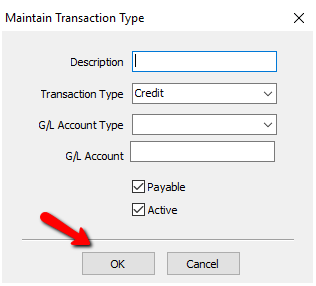
- Select the OK button when done.


Next Article In Section
Click the following link to move to the next article in this section:
Vendor User Fields