Table of Contents
Printing a Pick List
Pick Lists are handy in two different situations. One is when an item or items sell at auction and you wish to print a list of the items to pull from inventory to start the shipping process. The second is when it is time to remove unsold items from inventory.
When printing a Pick List for unsold items, whether or not items are included in the Pick List depends upon the date they were received and the Pickup Period specified for the items' Price Codes.
Example: 2 items are brought in on January 1st. Item #1 and #2 have Price Code A. Item #3 has Price Code B. The Pickup Period for Price Code A is 90 days. The Pickup Period for Price Code B is 0.
Item #1 sells. Item #2 and item #3 do not sell.
A Pick List is run April 15th (approximately 105 days later). Item #1 is not listed on the Pick List because it sold. Item #2 is listed on the Pick List because more than 90 days have transpired since item #1 was received. Item #3 is not listed on the Pick List because setting the Pickup Period to 0 disables all Pickup Date functionality, including a) listing the pickup date on the Item List and b) listing an unsold item on a Pick List.
How To Access The Pick List
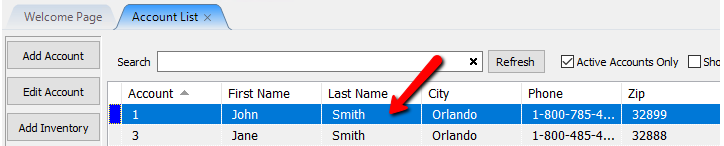
- In Liberty Inventory, Lookup the account. Double click on the account you want to access to open its details.
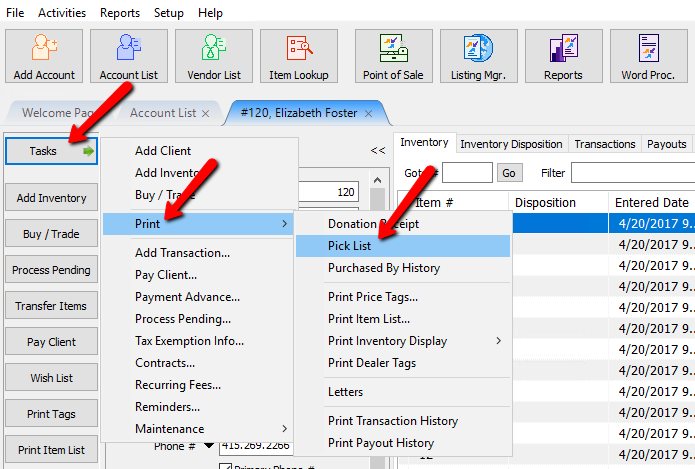
- Once the account is open, Select Task > Print > Pick List.
The Pick List dialog box will open.
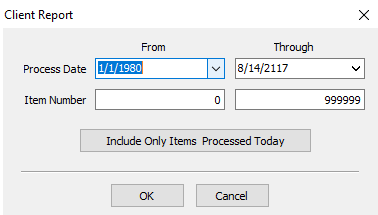
- Process Date : Use this to find items based on the date the items went on the floor to be sold.
- Item Number : Use this to find items based on the Item number.
- Include Only Items Processed Today : Use this button to only find the items that went on the floor today to be sold.
- Click the OK button when done.
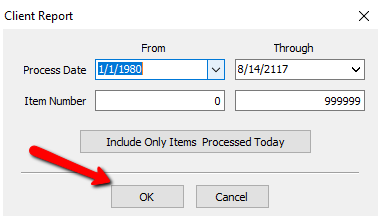


The Pick List will be generated.

Next Article In Section
Click the following link to move to the next article in this section:
Printing a Donor Receipt