Table of Contents
How to Expire a Posted Payment
The Expired payout status is intended to be used for a check payout that has been issued, but was never deposited or cashed by the consignor and is no longer eligible to be deposited or cashed. Marking a check payout as Expired is not the same thing as deleting a payout - in fact, if the intent is to re-issue the payout, then the original payout must be deleted at some point.
Expired payouts do not show up on the list of Checks to Clear (Activities > Accounting > Clear Checks).
The Expired status can be used as a filter for reporting purposes. Expiring a payout has no impact on QuickBooks, for those using the QuickBooks Link or QuickBooks Export.
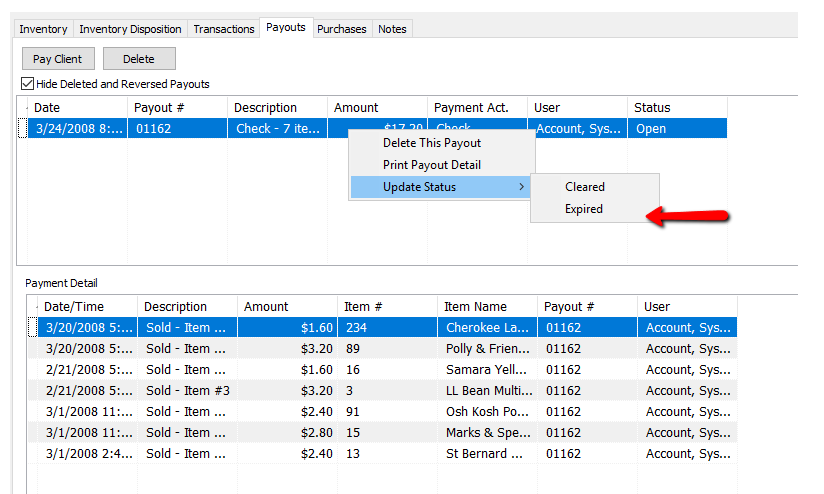
- To mark a check payout as “Expired”, navigate to the Payouts tab in an account
- Right-click the payout, choose Update Status, then select “Expired”. Only payouts with a status of Open may be marked as Expired.
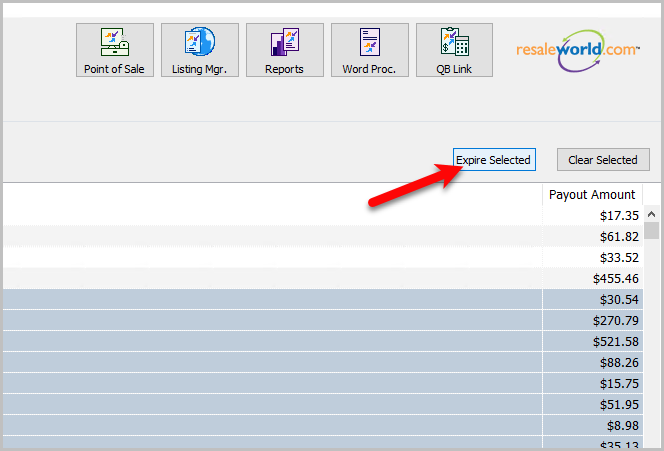
- You can also expire items in bulk now.


Next Article In Section
Click the following link to move to the next article in this section:
Assessing Fees to Accounts and Items
Related Topics
How to Expire a Posted Payment Determine Amount Payable to an Account Holder Assessing Fees to Accounts and Items Change Payment Account for Multiple Accounts How to setup check fees How To Set A Check Address Offset Clear Checks Combine/Reconcile open Transactions Credit/Debit a Client Account Payment Advance