Table of Contents
How To Set A Check Address Offset
By setting the check address offset, you can adjust where the address prints on checks, so that it will align with the address window on an envelope.
Setting The Check Address Offset
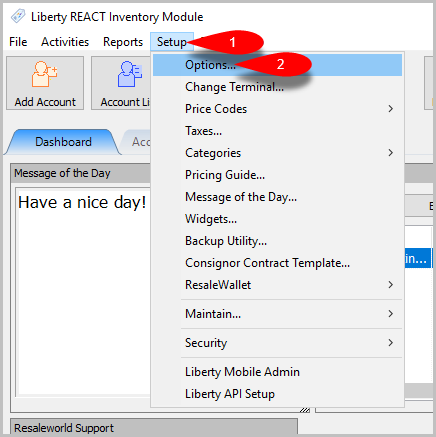
- First click on Setup then Options…
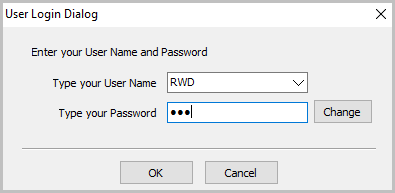
- Log in with your Liberty account.
- Click on Payout then fill in the offset you would like in Offset Check Address from 0.25 to -0.25.
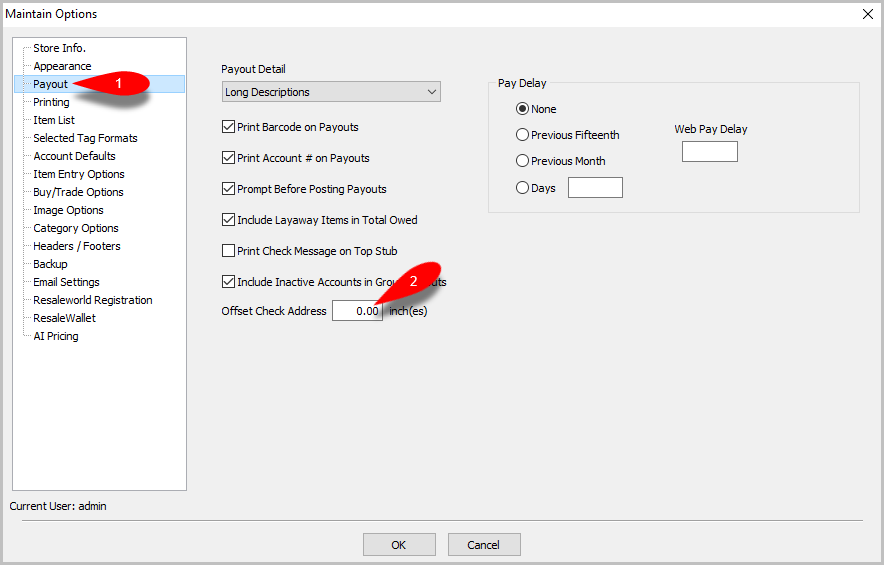


Note: NEGATIVE numbers move the address UP while POSITIVE numbers move the address DOWN. If the address is moved UP then you MUST uncheck Print Account # on Payouts or there will be overlap.


Next Article In Section
Click the following link to move to the next article in this section:
View Payout History
Related Topics
How To Set A Check Address Offset Determine Amount Payable to an Account Holder Assessing Fees to Accounts and Items Change Payment Account for Multiple Accounts How to setup check fees Clear Checks Combine/Reconcile open Transactions Credit/Debit a Client Account How to Expire a Posted Payment Payment Advance