Table of Contents
How to setup check fees
Check fees are now known as payout fees.
Where To Set Payout Fee
This is the normal text style
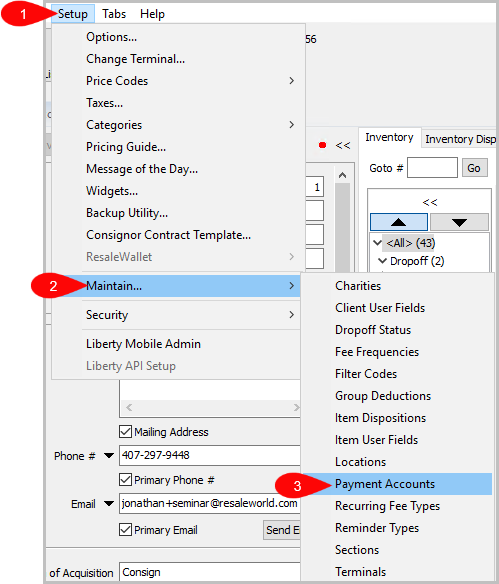
- Setup > Maintain > Payment Accounts
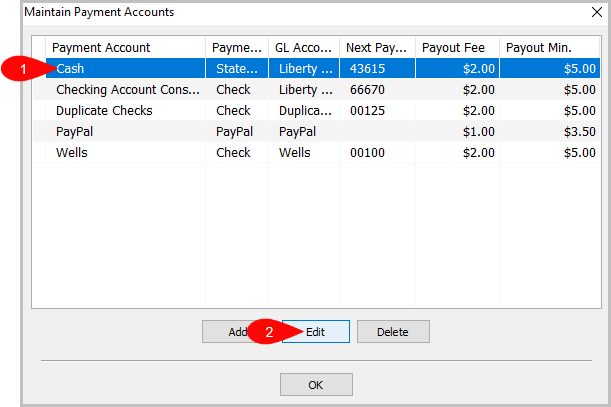
- Select the payment account you want to add the payout fee to.
- Now click on ‘Edit’.
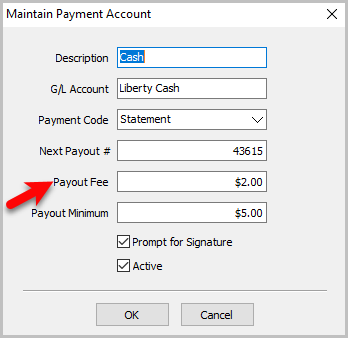
In this example, we are going to change the cash payout fee.
- If you want to make sure it sticks to ACH, Cash, or Check.
You will have to select each payment account and edit the payment account type
you want to change the fee for.


Next Article In Section
Click the following link to move to the next article in this section:
How To Set A Check Address Offset
Related Topics
How to setup check fees Determine Amount Payable to an Account Holder Assessing Fees to Accounts and Items Change Payment Account for Multiple Accounts How To Set A Check Address Offset Clear Checks Combine/Reconcile open Transactions Credit/Debit a Client Account How to Expire a Posted Payment Payment Advance