Table of Contents
How To List An Item On eBay Using the Listing Manager
If the YouTube Video looks fuzzy/blurry, try doing the following steps.
- Click the Fullscreen button on the video located at the bottom right corner of the video frame.

- Click on the Settings Cog.

- Select the right arrow head next to Quality.
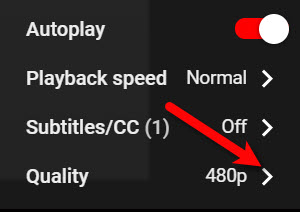
- Select the highest quality level that you have access to, our recommendation is 1080p if you can manage it.


If 720p is all that you can manage, then select that.
This will allow your video to display in fullscreen mode and in the highest definition available, the video should no longer be blurry/fuzzy after this point.

Next Article In Section
Click the following link to move to the next article in this section:
How To Create A Shopify/ShopRW Listing
Related Topics
How To List An Item On eBay Using the Listing Manager Setting Up Liberty Listing Manager To List Your First Ebay Item How To List An Item On eBay Using The Listing Manager Creating an eBay Listing Overview eBay Specific Info. Listing Fields Adding eBay Package Information Adding An eBay Description Definitions of Ebay Description Processor Buttons Editing An eBay Description in HTML Previewing An eBay Web Description Adding Images To An eBay Listing