Table of Contents
Placing a Watermark Image On Your Pictures Android
- Open the Liberty Photo App on your iDevice and then Sign In.
If you are not familiar with this procedure please visit the following page:
Opening The Liberty Photo App Android - Search for the item by using either Account-Item Number or by scanning a tag using the Scan Tag button.
Then open the item.
You can use the following articles for more information if needed:
How Use The Camera To Add Images To Items By Using Account - Item Number Android
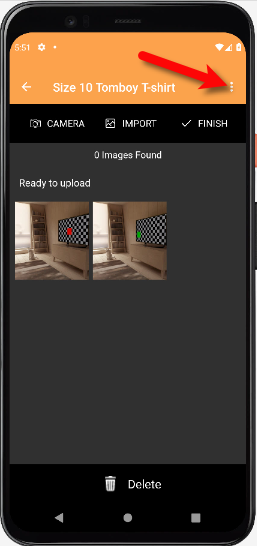
How To Add Images To An Item Using A Barcode On The Tag Android - Tap the Three Dots menu button at the top right of the screen.
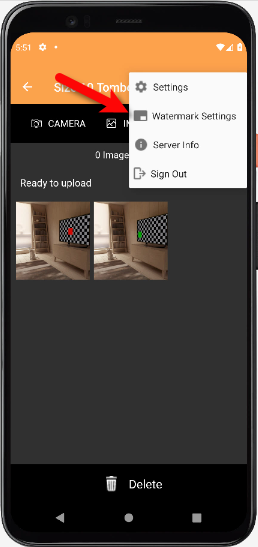
- Tap the Watermark settings button.
- A watermark makes an image uniquely your stores.
You have some options that you can edit for your Watermark.
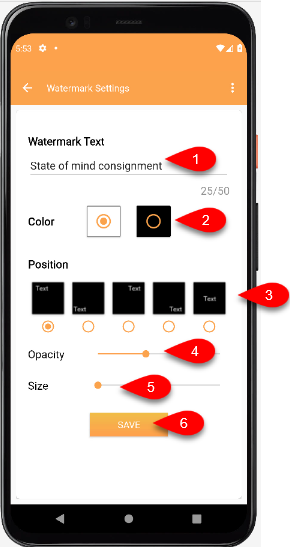
- Watermark Text: This text that you type in will appear on all of the pictures you take.
- Color: Sets if you want a border around the Watermark text.
- Position: Allows you to select what position you want the Watermark to appear at on your image.
- Opacity: Sets if you want to make the text slightly see through or solid.
- Size: Sets the size of the Watermark from Small to Large.
- Tap the Save button when you are done.


Next Article In Section
Click the following link to move to the next article in this section:
Changing Which Server You Want To Connect To Android
Related Topics
Placing a Watermark Image On Your Pictures Android How To Download and Setup The Liberty Photo App for Android How To Use The Liberty Photo App for Android Overview Opening The Liberty Photo App Android How Use The Camera To Add Images To Items By Using Account - Item Number Android How To Add Images To An Item Using A Barcode On The Tag Android How To Delete Images From The Liberty Photo App Android How to Edit A Photo That Is Attached To An Item Android How To Add Images Using the Import Feature (From Local Disk and Other Sources) Android Editing The Settings Within Liberty Photo App Android Changing Which Server You Want To Connect To Android