Table of Contents
Getting the IP Address Of Your Server
Getting the IP Address Of Your Server
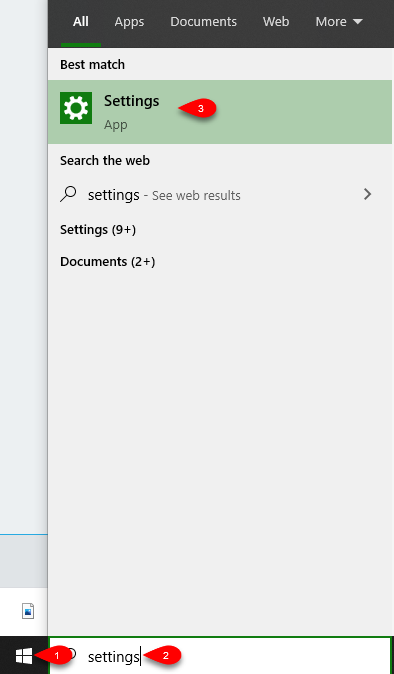
- Click the Start menu on the server computer and then type Settings, then click the Settings app.
- Click the Network & Internet settings applet.

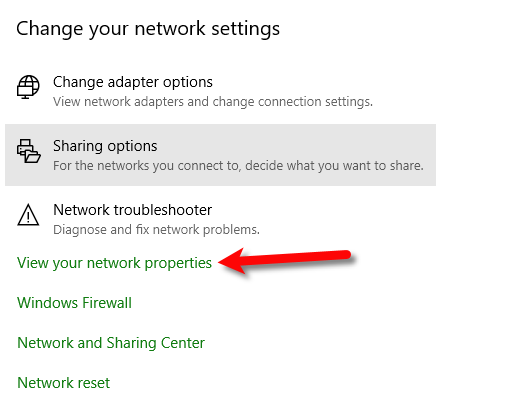
- Click on View your network properties
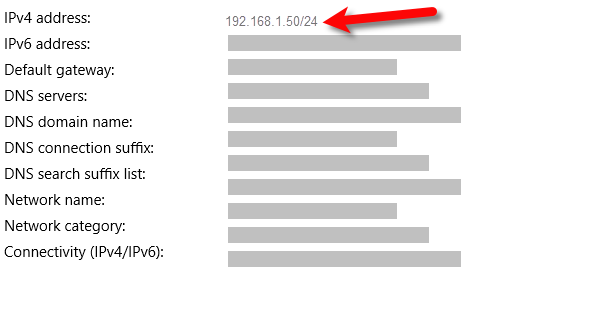
- Note your Server’s IP address.


Next Article In Section
Click the following link to move to the next article in this section:
Connecting The Item Entry App To Your Server Computer
Related Topics
Getting the IP Address Of Your Server Liberty Item Entry Application Setup Overview Downloading the Liberty Item Entry Application From The Apple App Store Creating a Device Key for your iDevice Connecting The Item Entry App To Your Server Computer Reading The Sales Data Setting Up The Liberty Sales App How To Install and Use The Item Entry Lite App In Demo Mode Setting Up The Liberty Item Entry Lite App Adding Items To Shopify Through The Item Entry App How To Send Existing Items To Shopify Through The Liberty Item Entry App