Table of Contents
Downloading the Liberty Item Entry Application From The Apple App Store
Downloading the Liberty Item Entry Application From The Apple App Store
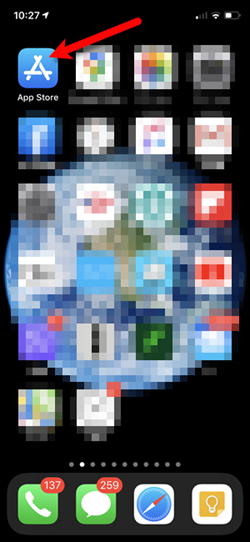
- Open the App Store.
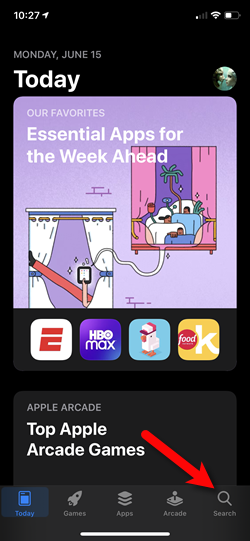
- Tap the Search button at the bottom right.
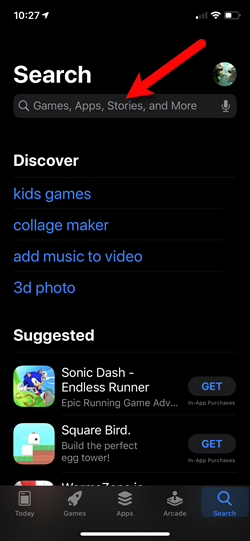
- Tap on the Search field at the top.
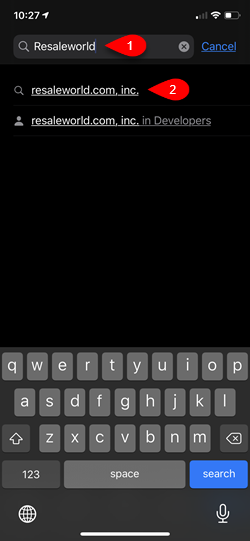
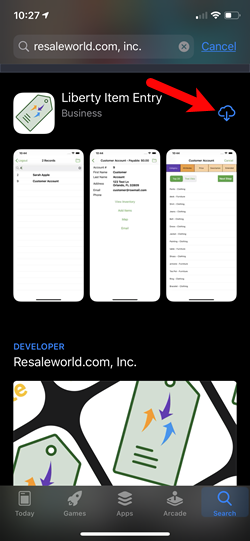
- Type Resaleworld into the search box and then tap on resaleworld.com, inc.
- Tap the Install option.
You will then be prompted to sign in with your Apple ID and Password.
This is required in order to install the app even though the app costs nothing.
- Once you see the OPEN button, the installation has been completed.


You can tap your Home button or swipe up from the bottom if you do not have a Home button to get back to your Home screen.

Next Article In Section
Click the following link to move to the next article in this section:
Creating a Device Key for your iDevice
Related Topics
Downloading the Liberty Item Entry Application From The Apple App Store Liberty Item Entry Application Setup Overview
Liberty Item Entry Application Setup Overview Creating a Device Key for your iDevice Getting the IP Address Of Your Server Connecting The Item Entry App To Your Server Computer Reading The Sales Data Setting Up The Liberty Sales App How To Install and Use The Item Entry Lite App In Demo Mode Setting Up The Liberty Item Entry Lite App Adding Items To Shopify Through The Item Entry App How To Send Existing Items To Shopify Through The Liberty Item Entry App